<?xml version="1.0" encoding="utf-8"?><?xml-stylesheet type="text/xsl" href="atom.xsl"?>
<feed xmlns="http://www.w3.org/2005/Atom">
    <id>https://blog.l4n14ke4.dev/en/</id>
    <title>L4N14KE4 Blog</title>
    <updated>2026-08-20T00:00:00.000Z</updated>
    <generator>https://github.com/jpmonette/feed</generator>
    <link rel="alternate" href="https://blog.l4n14ke4.dev/en/"/>
    <subtitle>L4N14KE4 Blog</subtitle>
    <icon>https://blog.l4n14ke4.dev/en/img/favicon.ico</icon>
    <entry>
        <title type="html"><![CDATA[My Experience with the 2026 H1 Google Cloud Study Jam]]></title>
        <id>https://blog.l4n14ke4.dev/en/review/google-cloud-study-jam-2026</id>
        <link href="https://blog.l4n14ke4.dev/en/review/google-cloud-study-jam-2026"/>
        <updated>2026-08-20T00:00:00.000Z</updated>
        <summary type="html"><![CDATA[I participated in the Google Cloud Study Jam in the first half of 2026, earned 44 badges, and even attended the offline hackathon. Here is my recap.]]></summary>
        <content type="html"><![CDATA[<p>I participated in the Google Cloud Study Jam in the first half of 2026, earned 44 badges, and even attended the offline hackathon. Here is my recap.</p>
<p><img decoding="async" loading="lazy" alt="google-cloud-study-jam-2026" src="https://blog.l4n14ke4.dev/en/assets/images/google-cloud-study-jam-2026-en-f435d79620d5719e702496fda9add9fb.png" width="1200" height="630" class="img_ev3q"></p>
<h2 class="anchor anchorTargetStickyNavbar_Vzrq" id="tldr">TL;DR<a href="https://blog.l4n14ke4.dev/en/review/google-cloud-study-jam-2026#tldr" class="hash-link" aria-label="Direct link to TL;DR" title="Direct link to TL;DR" translate="no">​</a></h2>
<p>It is an online self-study program where you earn badges by completing hands-on labs on the Google Skills platform. Completion rewards are given based on the number of badges earned, and I received the top-tier reward with 18 skill badges + 26 completion badges (44 in total). I also participated in the offline hackathon for program participants.</p>
<hr>
<h2 class="anchor anchorTargetStickyNavbar_Vzrq" id="what-is-the-google-cloud-study-jam">What is the Google Cloud Study Jam?<a href="https://blog.l4n14ke4.dev/en/review/google-cloud-study-jam-2026#what-is-the-google-cloud-study-jam" class="hash-link" aria-label="Direct link to What is the Google Cloud Study Jam?" title="Direct link to What is the Google Cloud Study Jam?" translate="no">​</a></h2>
<p>The Google Cloud Study Jam (hereafter "Study Jam") is an online self-study project where you learn and practice Google AI and Google Cloud through hands-on labs on the Google Skills platform.</p>
<p>Google Skills is Google's unified learning platform for AI and cloud technologies, offering more than 3,000 free and paid practical courses, hands-on coding labs, and official technical badges and certifications.</p>
<p>I first learned about the Study Jam through X (Twitter), and since applications happened to be open at the time, I signed up for the 2026 Q1 cohort. Reportedly, about 10,000 people participated in this round.</p>
<h2 class="anchor anchorTargetStickyNavbar_Vzrq" id="participation-benefits">Participation Benefits<a href="https://blog.l4n14ke4.dev/en/review/google-cloud-study-jam-2026#participation-benefits" class="hash-link" aria-label="Direct link to Participation Benefits" title="Direct link to Participation Benefits" translate="no">​</a></h2>
<p><img decoding="async" loading="lazy" alt="benefits-of-participation" src="https://blog.l4n14ke4.dev/en/assets/images/benefits-of-participation-1f49673f96138262e04fa66f3aa4ef19.png" width="540" height="534" class="img_ev3q"></p>
<h3 class="anchor anchorTargetStickyNavbar_Vzrq" id="1-completion-rewards">1. Completion Rewards<a href="https://blog.l4n14ke4.dev/en/review/google-cloud-study-jam-2026#1-completion-rewards" class="hash-link" aria-label="Direct link to 1. Completion Rewards" title="Direct link to 1. Completion Rewards" translate="no">​</a></h3>
<p>Honestly, this was the most important part for me, and I suspect it is why many others started as well. Rewards are given based on the type and number of badges earned during the Study Jam period.</p>


<table><thead><tr><th>Requirement</th><th>Reward</th></tr></thead><tbody><tr><td>10+ badges (including 6+ skill badges)</td><td>Stickers + Google badge set + T-shirt</td></tr><tr><td>18+ badges (including 9+ skill badges)</td><td>Above + windbreaker</td></tr><tr><td>32+ badges (including 16+ skill badges)</td><td>Above + backpack</td></tr><tr><td>Top 30 by skill badges earned during the period</td><td>Chrome Dino blanket + Google bicycle keyring (bonus)</td></tr></tbody></table>
<h4 class="anchor anchorTargetStickyNavbar_Vzrq" id="badge-types">Badge Types<a href="https://blog.l4n14ke4.dev/en/review/google-cloud-study-jam-2026#badge-types" class="hash-link" aria-label="Direct link to Badge Types" title="Direct link to Badge Types" translate="no">​</a></h4>
<p>You receive a badge for each course you complete, and badges are divided into <strong>Skill Badges</strong> and <strong>Completion Badges</strong>.</p>


<table><thead><tr><th></th><th>Skill Badge</th><th>Completion Badge</th></tr></thead><tbody><tr><td>Meaning</td><td>A competency-based digital credential recognized by Google Cloud, proving hands-on problem-solving ability</td><td>A digital credential proving that you have fully completed a specific course or quest</td></tr><tr><td>Structure</td><td>A series of related hands-on labs + a final Challenge Lab</td><td>Video lectures, PDF materials, or basic hands-on labs</td></tr><tr><td>How to earn</td><td>You must solve and pass the practical task in the Challenge Lab on your own, based on what you have learned</td><td>Earned by watching the provided content or simply completing the given course</td></tr><tr><td>Time required</td><td>At least 1–2 hours</td><td>Relatively short (some courses take less than 5 minutes)</td></tr></tbody></table>
<p>Skill badges take more time and effort than completion badges.</p>
<h3 class="anchor anchorTargetStickyNavbar_Vzrq" id="2-free-credits">2. Free Credits<a href="https://blog.l4n14ke4.dev/en/review/google-cloud-study-jam-2026#2-free-credits" class="hash-link" aria-label="Direct link to 2. Free Credits" title="Direct link to 2. Free Credits" translate="no">​</a></h3>
<p>Most hands-on labs require credits, but the Study Jam provided 209 credits, so I could complete everything for free. Credits are mainly used for the labs required to earn skill badges.</p>
<h3 class="anchor anchorTargetStickyNavbar_Vzrq" id="3-hackathon-opportunity">3. Hackathon Opportunity<a href="https://blog.l4n14ke4.dev/en/review/google-cloud-study-jam-2026#3-hackathon-opportunity" class="hash-link" aria-label="Direct link to 3. Hackathon Opportunity" title="Direct link to 3. Hackathon Opportunity" translate="no">​</a></h3>
<p>Participants can apply for a chance to join the offline hackathon (Google Cloud Study Jam Hackathon). My recap of the hackathon is at the bottom of this post.</p>
<h2 class="anchor anchorTargetStickyNavbar_Vzrq" id="tips-for-the-study-jam">Tips for the Study Jam<a href="https://blog.l4n14ke4.dev/en/review/google-cloud-study-jam-2026#tips-for-the-study-jam" class="hash-link" aria-label="Direct link to Tips for the Study Jam" title="Direct link to Tips for the Study Jam" translate="no">​</a></h2>
<h3 class="anchor anchorTargetStickyNavbar_Vzrq" id="choosing-courses">Choosing Courses<a href="https://blog.l4n14ke4.dev/en/review/google-cloud-study-jam-2026#choosing-courses" class="hash-link" aria-label="Direct link to Choosing Courses" title="Direct link to Choosing Courses" translate="no">​</a></h3>
<ul>
<li class="">Browse the catalog, courses, and collections, then pick the ones that suit you. The orientation slides sent by email include recommended courses, so they are worth checking.</li>
<li class="">For skill badges, just pick whatever interests you. For completion badges, if you are running out of things to complete, I recommend the <strong>AI Boost Bites</strong> courses in the collections. Each one takes less than 5 minutes, which makes them great for padding your badge count.</li>
<li class="">Beyond that, set the catalog difficulty filter to "Introductory" and pick whatever looks easy. The same goes for skill badges.</li>
</ul>
<h3 class="anchor anchorTargetStickyNavbar_Vzrq" id="doing-the-labs">Doing the Labs<a href="https://blog.l4n14ke4.dev/en/review/google-cloud-study-jam-2026#doing-the-labs" class="hash-link" aria-label="Direct link to Doing the Labs" title="Direct link to Doing the Labs" translate="no">​</a></h3>
<ol>
<li class="">Before starting a lab, it is worth checking that it <strong>has been updated recently</strong>. As the cloud environment changes over time, some labs no longer work, or cannot be marked complete even if you follow the steps exactly. Until this June you could judge by user star ratings, but those have since been removed, so recently updated labs are more likely to work properly.</li>
<li class="">When doing a lab, it is best to split your screen in half: one window with the Google Skills lab instructions, and one <strong>incognito window with the Google Cloud Console</strong>. This prevents you from accidentally logging in with your personal Google Cloud account. For the same reason, I recommend closing the incognito window and opening a new one before moving on to the next lab.</li>
<li class="">Set the language to <strong>English</strong>. Translations can be awkward, and since the Google Cloud lab environment itself is in English, it is easier to follow along. If English is difficult, extensions like Immersive Translate that show a Korean translation below the original text can help.</li>
<li class="">Even if you close the lab window or leave in the middle, you can go back in and continue where you left off. There is generally plenty of time.</li>
<li class="">If a lab is difficult, you can search the lab name or number on Google and follow a YouTube walkthrough. There was always at least one video uploaded by Indian creators. Note, however, that very short 1–3 minute videos usually complete the lab automatically with a script, so look carefully before following them.</li>
</ol>
<h2 class="anchor anchorTargetStickyNavbar_Vzrq" id="results">Results<a href="https://blog.l4n14ke4.dev/en/review/google-cloud-study-jam-2026#results" class="hash-link" aria-label="Direct link to Results" title="Direct link to Results" translate="no">​</a></h2>
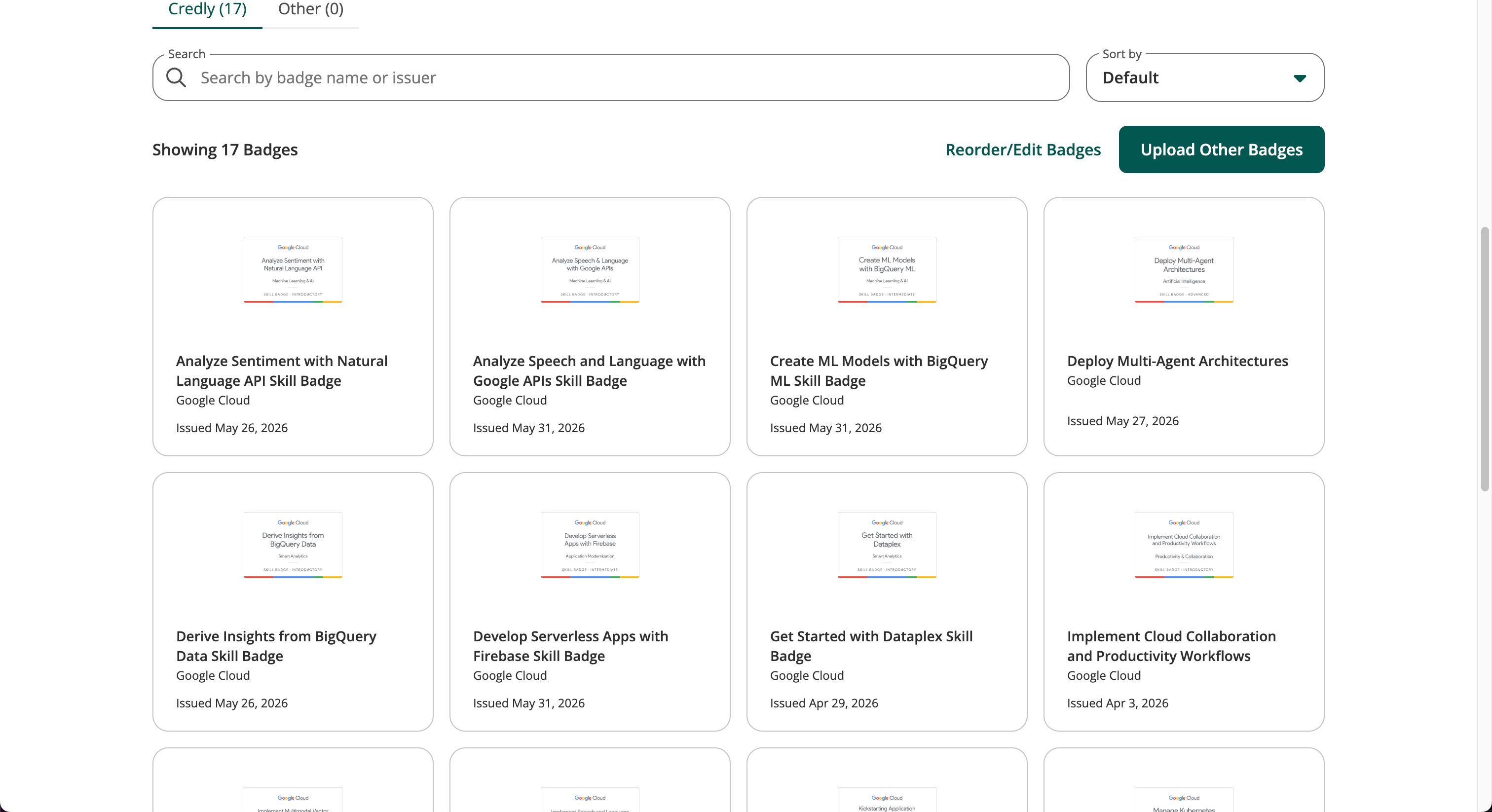
<p>You can see the badges you have earned by clicking "View credentials" at the bottom of the page and selecting Completed.</p>
<p>In my case, I earned <strong>18 skill badges and 26 completion badges, for a total of 44 badges</strong>. Skill badges can also be uploaded to Credly and added to LinkedIn.</p>
<p><img decoding="async" loading="lazy" alt="credly-badge" src="https://blog.l4n14ke4.dev/en/assets/images/credly-badge-6d952f123b4558ee538e46a39c8c1df9.png" width="3024" height="1646" class="img_ev3q"></p>
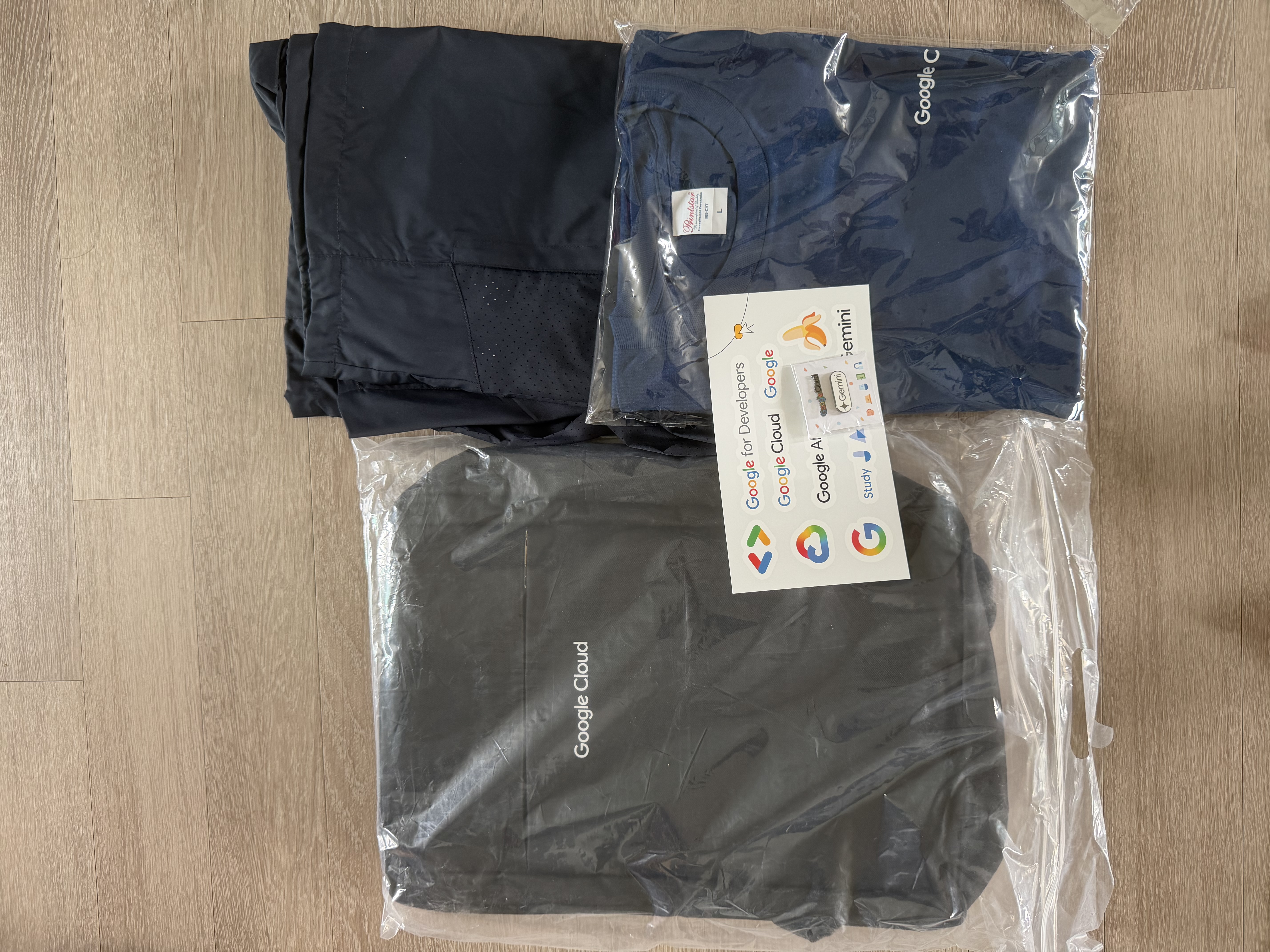
<p>Having earned more than 32 badges, I qualified for the highest reward tier. Perhaps because more than 10,000 people participated, the reward shipment was delayed twice.</p>
<p><img decoding="async" loading="lazy" alt="souvenirs" src="https://blog.l4n14ke4.dev/en/assets/images/souvenirs-5acce024f42406b60bfe6d8f2b2ea0de.jpeg" width="5712" height="4284" class="img_ev3q"></p>
<p>All of the clothing and merchandise is marked with the Google Cloud logo. I have not used the other items yet, but the T-shirt was pure cotton and the quality was decent.</p>
<h2 class="anchor anchorTargetStickyNavbar_Vzrq" id="google-cloud-study-jam-hackathon">Google Cloud Study Jam Hackathon<a href="https://blog.l4n14ke4.dev/en/review/google-cloud-study-jam-2026#google-cloud-study-jam-hackathon" class="hash-link" aria-label="Direct link to Google Cloud Study Jam Hackathon" title="Direct link to Google Cloud Study Jam Hackathon" translate="no">​</a></h2>
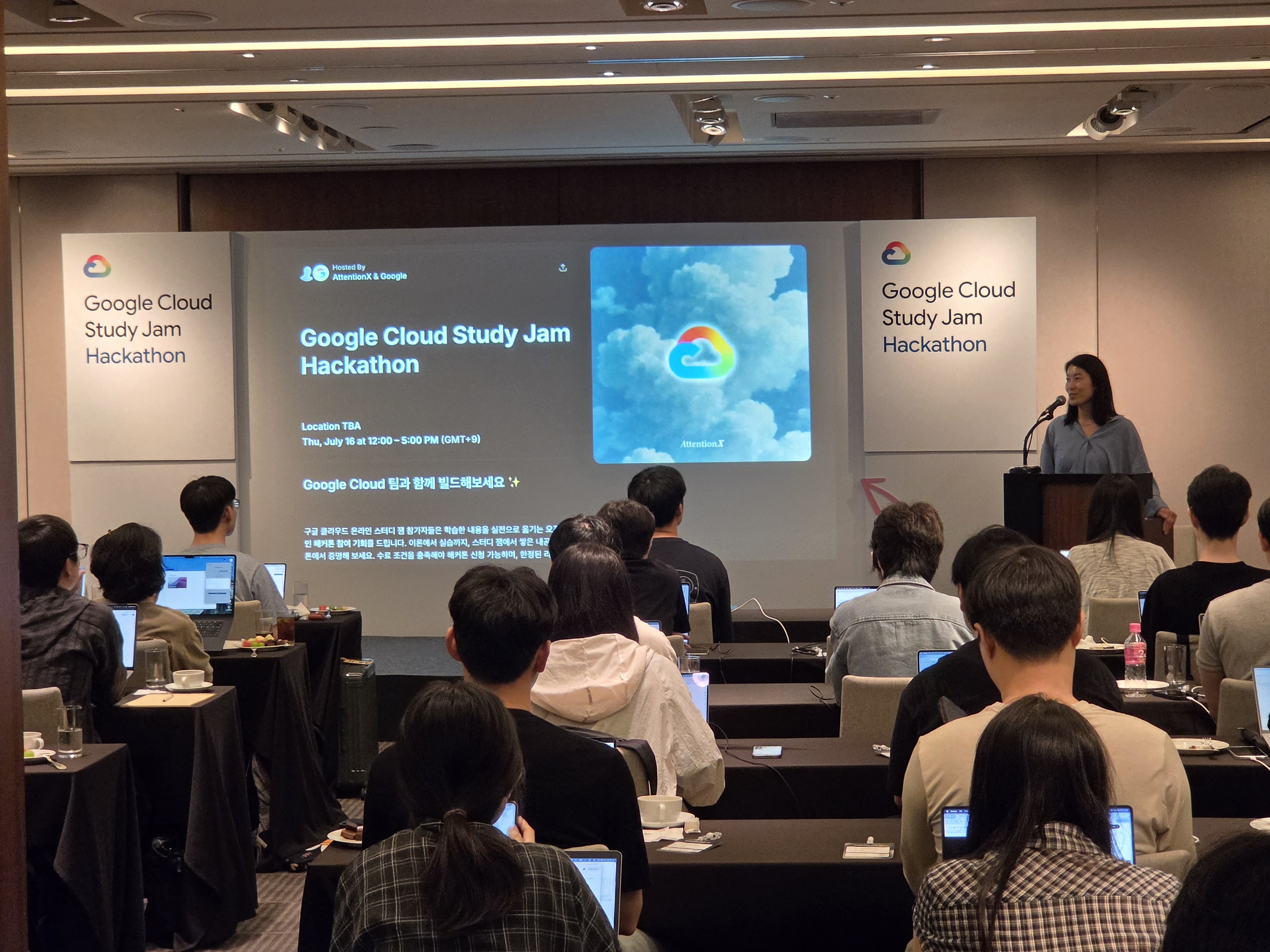
<p><img decoding="async" loading="lazy" alt="hackathon1" src="https://blog.l4n14ke4.dev/en/assets/images/hackathon1-6a5e91f70b0c570bf9c246da07f4174e.jpeg" width="4000" height="3000" class="img_ev3q"></p>
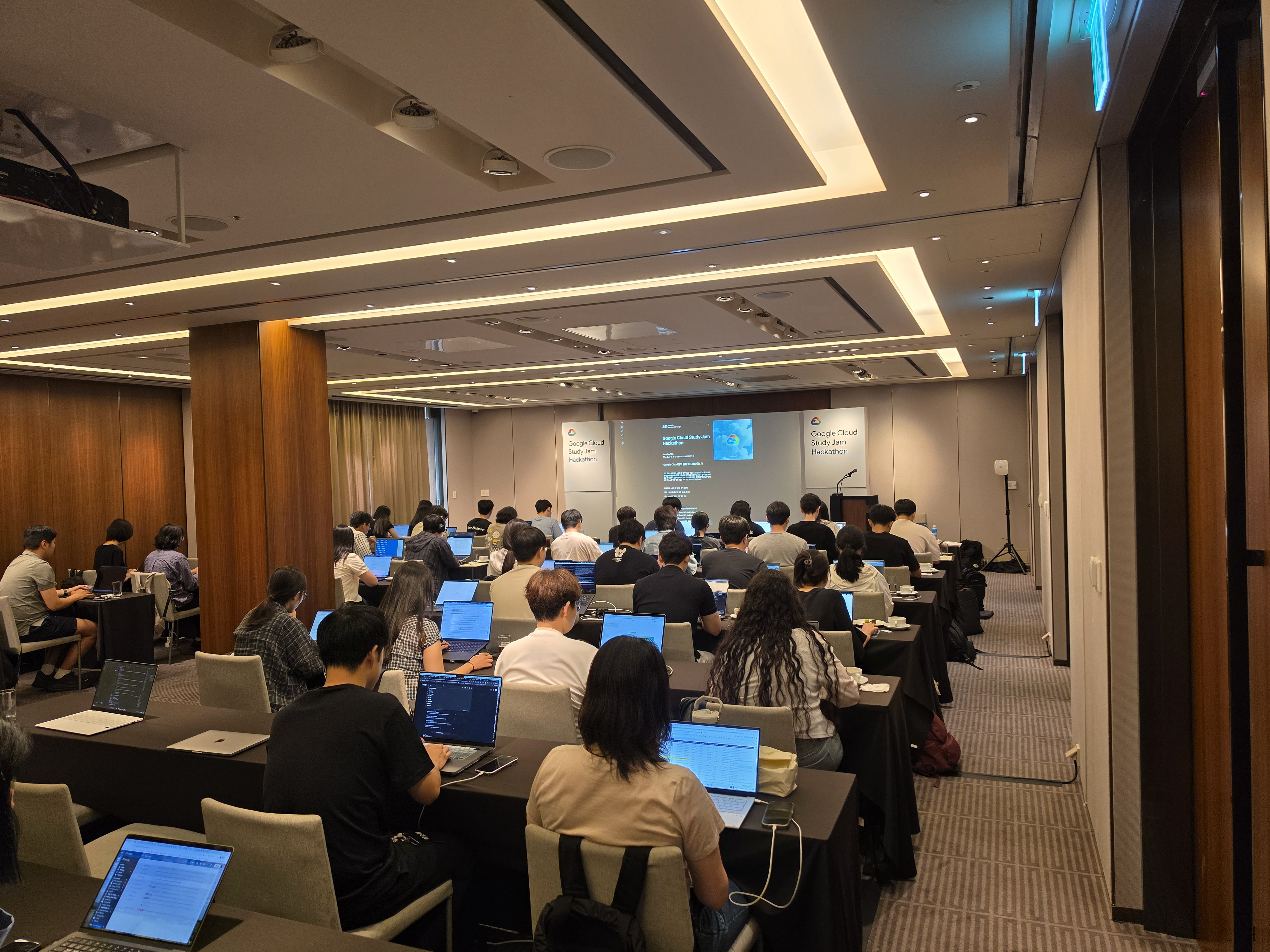
<p><img decoding="async" loading="lazy" alt="hackathon2" src="https://blog.l4n14ke4.dev/en/assets/images/hackathon2-bb7e2931e6f1686bf7851e43005a2d4d.jpeg" width="4000" height="3000" class="img_ev3q"></p>
<p>After the Study Jam ended, I applied for the Google Cloud Study Jam Hackathon, was selected, and attended. Around 50 people participated, and it was held in the Orchid Room at The Shilla Seoul. Development had to make use of Google AI technologies and tools such as Google AI Studio and Antigravity.</p>
<h3 class="anchor anchorTargetStickyNavbar_Vzrq" id="themes">Themes<a href="https://blog.l4n14ke4.dev/en/review/google-cloud-study-jam-2026#themes" class="hash-link" aria-label="Direct link to Themes" title="Direct link to Themes" translate="no">​</a></h3>
<p>We chose one of the following three themes.</p>
<ol>
<li class=""><strong>Gemini in Entertainment</strong> — Korea—particularly Seoul—is a global powerhouse in entertainment. How can you leverage Google's AI products to create breakthrough experiences across music, TV, film, and gaming?</li>
<li class=""><strong>Gemini in Hard Tech</strong> — Korea's hard tech ecosystem is surging. How can you build with Gemini to accelerate development in hardware, biotech, data centers, energy, and aerospace?</li>
<li class=""><strong>Google AI for Social Good</strong> — As AI technology continues to evolve, using AI for social good is more important than ever. How can you leverage AI to create meaningful, positive impact and help make the world a better place?</li>
</ol>
<h3 class="anchor anchorTargetStickyNavbar_Vzrq" id="format-and-deliverables">Format and Deliverables<a href="https://blog.l4n14ke4.dev/en/review/google-cloud-study-jam-2026#format-and-deliverables" class="hash-link" aria-label="Direct link to Format and Deliverables" title="Direct link to Format and Deliverables" translate="no">​</a></h3>
<p>The event ran from 12:00 to 17:00, but only 2 hours were given for actual development. Perhaps because of this, the themes were announced by email two days in advance, which effectively meant "come prepared."</p>
<p>The three deliverables below were required, and 2 hours was nowhere near enough — recording the video alone took over 30 minutes. In practice, you need to have your project mostly finished within those two days.</p>
<ol>
<li class=""><strong>Project Description</strong></li>
<li class=""><strong>Public GitHub Repository</strong> (open-source code link)</li>
<li class=""><strong>Demo Video</strong> (a link on YouTube, Google Drive, etc.)
I chose <strong>Gemini in Entertainment</strong> and built a service that reads the dialogue and scenes of Korean webtoons with Gemini, then uses Gemini TTS so you can listen to them like an audiobook.</li>
</ol>
<h3 class="anchor anchorTargetStickyNavbar_Vzrq" id="judging-criteria-and-prizes">Judging Criteria and Prizes<a href="https://blog.l4n14ke4.dev/en/review/google-cloud-study-jam-2026#judging-criteria-and-prizes" class="hash-link" aria-label="Direct link to Judging Criteria and Prizes" title="Direct link to Judging Criteria and Prizes" translate="no">​</a></h3>
<ul>
<li class="">
<p><strong>Technical Demo:</strong> Is the project technically polished? Does the demo run correctly without errors?</p>
</li>
<li class="">
<p><strong>Impact:</strong> Does the project solve a real problem? Is the problem important enough?</p>
</li>
<li class="">
<p><strong>Creativity:</strong> How creative is the idea? Is it a fresh approach rather than something commonly seen before?
A total of $4,000 in prizes was allocated.</p>
</li>
<li class="">
<p><strong>1st place:</strong> $2,000 in Gemini API credits + Google Fitbit Air</p>
</li>
<li class="">
<p><strong>2nd place:</strong> $1,000 in Gemini API credits + Google Fitbit Air</p>
</li>
<li class="">
<p><strong>3rd place:</strong> $500 in Gemini API credits + Google Fitbit Air</p>
</li>
<li class="">
<p><strong>People's Choice Award:</strong> $500 in Gemini API credits</p>
</li>
</ul>
<h3 class="anchor anchorTargetStickyNavbar_Vzrq" id="hackathon-impressions">Hackathon Impressions<a href="https://blog.l4n14ke4.dev/en/review/google-cloud-study-jam-2026#hackathon-impressions" class="hash-link" aria-label="Direct link to Hackathon Impressions" title="Direct link to Hackathon Impressions" translate="no">​</a></h3>
<p>Looking at the actual winning projects, the judges seemed to prefer works built on Google AI Studio over those built from scratch. Honestly, I am not sure the winning ideas were all that original — decently made AI Studio projects seemed to score highly. If you plan to join this hackathon, building with Google AI Studio, or even publishing your app there, will probably go over well with the judges.</p>
<p>There were some disappointments too. I think it would have been nice to give even $100 to each participant, and since we had to gather by noon, a boxed lunch would have been appreciated. Apparently last year's hackathon had a buffet, but not this time.</p>
<h2 class="anchor anchorTargetStickyNavbar_Vzrq" id="final-thoughts">Final Thoughts<a href="https://blog.l4n14ke4.dev/en/review/google-cloud-study-jam-2026#final-thoughts" class="hash-link" aria-label="Direct link to Final Thoughts" title="Direct link to Final Thoughts" translate="no">​</a></h2>
<p>I set a goal of completing at least one badge every day, like a daily habit.</p>
<p>Honestly, earning a skill badge does not mean I have truly mastered the technology, but I did pick up a tutorial-level understanding of which cloud features to use and how, and I would say the real value was simply becoming familiar with Google Cloud.</p>
<p>It may not be much, but earning the badges left me with a sense of accomplishment, and being able to post them on LinkedIn was a nice bonus. I was also happy to receive the Google Cloud merchandise, which was my original goal.</p>
<p>Having used Google Cloud before or knowing basic coding certainly helps, but even if you have not, the introductory difficulty is easy enough that I would recommend the program to anyone who is interested.</p>]]></content>
        <author>
            <name>L4N14KE4</name>
            <uri>https://github.com/L4N14KE4</uri>
        </author>
        <category label="Google Cloud" term="Google Cloud"/>
        <category label="Study Jam" term="Study Jam"/>
        <category label="Review" term="Review"/>
    </entry>
    <entry>
        <title type="html"><![CDATA[How to Fix a Blank Page That Won't Delete in Word]]></title>
        <id>https://blog.l4n14ke4.dev/en/troubleshooting/word-blank-page-wont-delete</id>
        <link href="https://blog.l4n14ke4.dev/en/troubleshooting/word-blank-page-wont-delete"/>
        <updated>2026-03-28T00:00:00.000Z</updated>
        <summary type="html"><![CDATA[A step-by-step guide to fixing a blank page that won't delete in Word.]]></summary>
        <content type="html"><![CDATA[<p>A step-by-step guide to fixing a blank page that won't delete in Word.</p>
<p><img decoding="async" loading="lazy" alt="word-blank-page-wont-delete-en.jpg" src="https://blog.l4n14ke4.dev/en/assets/images/word-blank-page-wont-delete-en-573dfcb10fa75351713ad86ed9e9849e.jpg" width="14173" height="7441" class="img_ev3q"></p>
<h2 class="anchor anchorTargetStickyNavbar_Vzrq" id="tldr">TL;DR<a href="https://blog.l4n14ke4.dev/en/troubleshooting/word-blank-page-wont-delete#tldr" class="hash-link" aria-label="Direct link to TL;DR" title="Direct link to TL;DR" translate="no">​</a></h2>
<p>Blank pages in Word can't be deleted directly. Show hidden formatting symbols (¶), then fix it based on the cause: use <code>Fn</code>+<code>Delete</code> to remove a break symbol, or hide the paragraph mark inside the previous page by setting its font size to 1pt and paragraph spacing to 0pt.</p>
<hr>
<h2 class="anchor anchorTargetStickyNavbar_Vzrq" id="my-situation">My Situation<a href="https://blog.l4n14ke4.dev/en/troubleshooting/word-blank-page-wont-delete#my-situation" class="hash-link" aria-label="Direct link to My Situation" title="Direct link to My Situation" translate="no">​</a></h2>
<p>I was trying to keep only page 2 of an official document and delete the unnecessary pages 1 and 3, but Backspace simply wouldn't remove them.</p>
<h2 class="anchor anchorTargetStickyNavbar_Vzrq" id="cause">Cause<a href="https://blog.l4n14ke4.dev/en/troubleshooting/word-blank-page-wont-delete#cause" class="hash-link" aria-label="Direct link to Cause" title="Direct link to Cause" translate="no">​</a></h2>
<p>Word protects the last paragraph mark (¶) in a document and will not allow it to be deleted, because it stores the formatting information for the entire document.</p>
<p>In my case, the page before the blank one contained a table. Word automatically adds a paragraph mark after every table, and when that mark overflows onto the next page, a blank page is created.</p>
<p>This means it's impossible to delete the blank page directly — the solution is to hide the paragraph mark within the previous page.</p>
<h3 class="anchor anchorTargetStickyNavbar_Vzrq" id="types-of-blank-pages">Types of Blank Pages<a href="https://blog.l4n14ke4.dev/en/troubleshooting/word-blank-page-wont-delete#types-of-blank-pages" class="hash-link" aria-label="Direct link to Types of Blank Pages" title="Direct link to Types of Blank Pages" translate="no">​</a></h3>
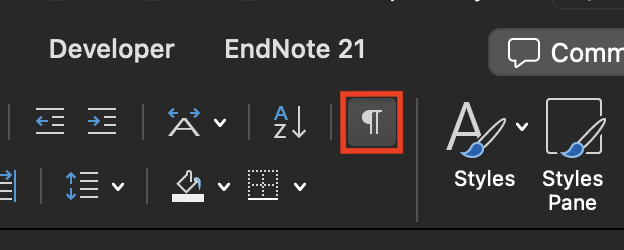
<p>There are 3 types. First, display hidden formatting symbols using the shortcut below or by clicking the Show/Hide ¶ button in the Home tab.</p>
<p><code>Command</code> + <code>8</code> (Windows: <code>Ctrl</code> + <code>Shift</code> + <code>8</code>)</p>
<img src="https://blog.l4n14ke4.dev/en/assets/images/display-non-printing-characters-btn-f15a5a6788ce3eb61f1020a5855c417f.png" style="width:400px">
<p>This reveals hidden symbols such as paragraph marks, page breaks, and section breaks.</p>
<ul>
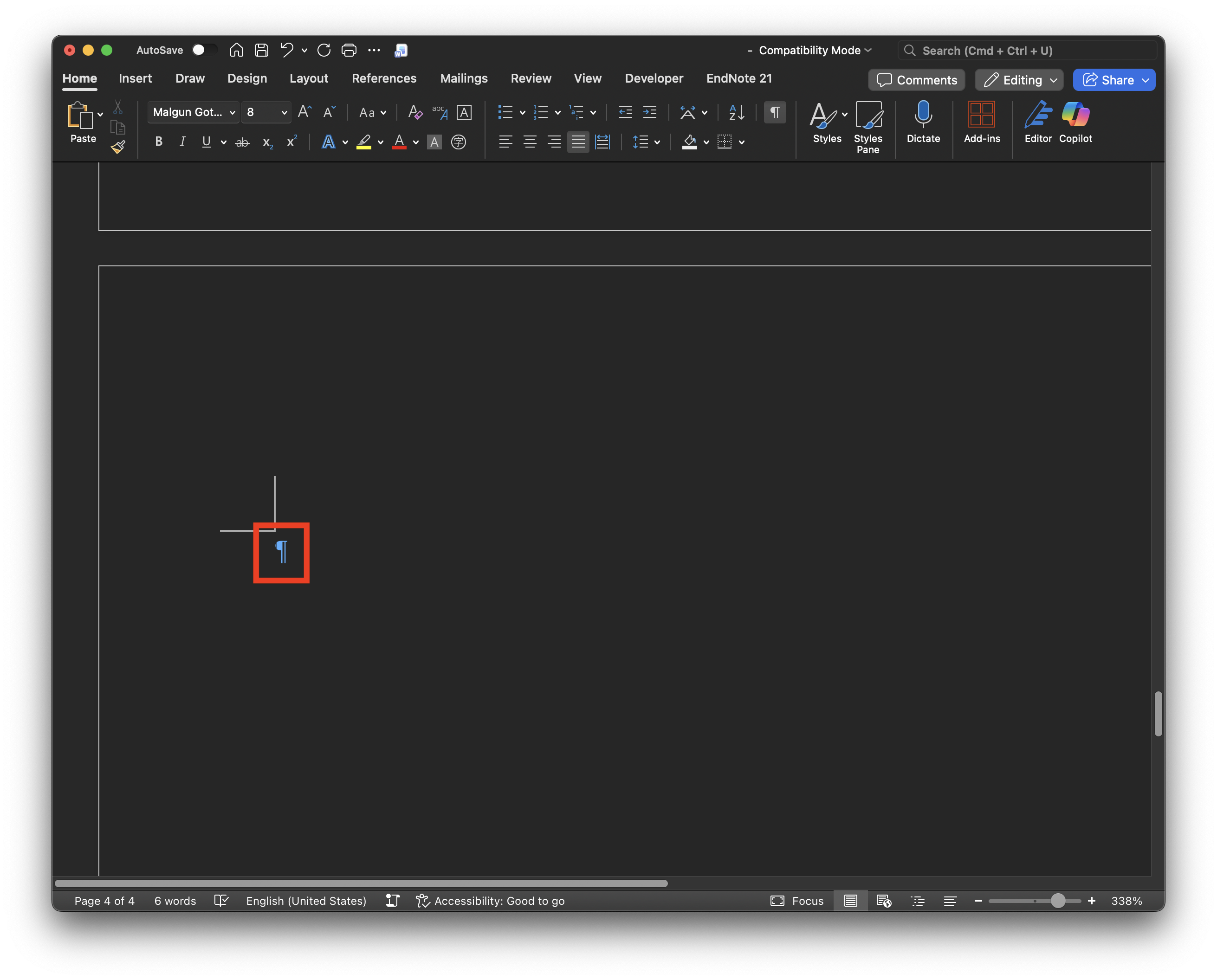
<li class="">Only a ¶ symbol is visible → Non-deletable paragraph mark (use Method 2)</li>
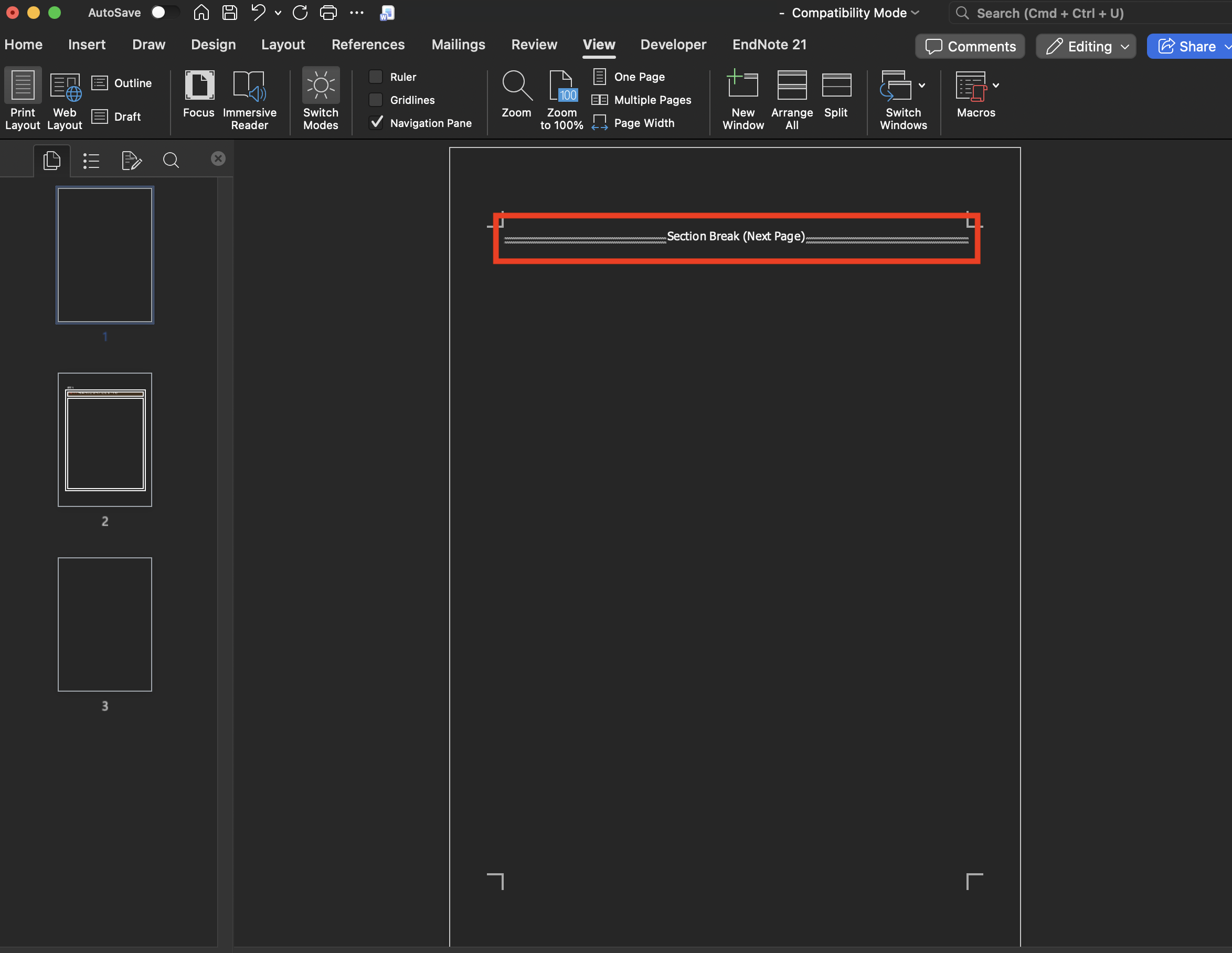
<li class=""><code>Section Break (Next Page)</code> is displayed → Section break is the cause (use Method 1)</li>
<li class=""><code>Page Break</code> is displayed → Manual page break is the cause (use Method 1)</li>
</ul>
<h2 class="anchor anchorTargetStickyNavbar_Vzrq" id="solutions">Solutions<a href="https://blog.l4n14ke4.dev/en/troubleshooting/word-blank-page-wont-delete#solutions" class="hash-link" aria-label="Direct link to Solutions" title="Direct link to Solutions" translate="no">​</a></h2>
<h3 class="anchor anchorTargetStickyNavbar_Vzrq" id="1-section-break--page-break">1. Section Break / Page Break<a href="https://blog.l4n14ke4.dev/en/troubleshooting/word-blank-page-wont-delete#1-section-break--page-break" class="hash-link" aria-label="Direct link to 1. Section Break / Page Break" title="Direct link to 1. Section Break / Page Break" translate="no">​</a></h3>
<p><img decoding="async" loading="lazy" alt="section-break.png" src="https://blog.l4n14ke4.dev/en/assets/images/section-break-ce74ef6f35da3e22fcdc6ac63a4c1a42.png" width="2348" height="1816" class="img_ev3q"></p>
<p>Place the cursor immediately before the symbol and press <code>Fn</code> + <code>Delete</code>. (Windows: <code>Delete</code>)</p>
<h3 class="anchor anchorTargetStickyNavbar_Vzrq" id="2-non-deletable-paragraph-mark-">2. Non-Deletable Paragraph Mark (¶)<a href="https://blog.l4n14ke4.dev/en/troubleshooting/word-blank-page-wont-delete#2-non-deletable-paragraph-mark-" class="hash-link" aria-label="Direct link to 2. Non-Deletable Paragraph Mark (¶)" title="Direct link to 2. Non-Deletable Paragraph Mark (¶)" translate="no">​</a></h3>
<p>There are 3 methods.</p>
<p><img decoding="async" loading="lazy" alt="paragraph.png" src="https://blog.l4n14ke4.dev/en/assets/images/paragraph-77b898aec01062e76b086f76d54b6943.png" width="2622" height="2112" class="img_ev3q"></p>
<h4 class="anchor anchorTargetStickyNavbar_Vzrq" id="method-1-reduce-font-size-to-1pt">Method 1. Reduce Font Size to 1pt<a href="https://blog.l4n14ke4.dev/en/troubleshooting/word-blank-page-wont-delete#method-1-reduce-font-size-to-1pt" class="hash-link" aria-label="Direct link to Method 1. Reduce Font Size to 1pt" title="Direct link to Method 1. Reduce Font Size to 1pt" translate="no">​</a></h4>
<ol>
<li class="">Display hidden formatting symbols. (See the Types section above)</li>
<li class="">Click the ¶ symbol on the blank page to select it.</li>
<li class="">Type <code>1</code> in the font size box and press <code>Enter</code></li>
</ol>
<p>The paragraph mark shrinks so small that it fits within the previous page, and the blank page disappears.</p>
<p>This didn't work for me alone, so I combined it with Methods 2 and 3 below.</p>
<h4 class="anchor anchorTargetStickyNavbar_Vzrq" id="method-2-adjust-paragraph-spacing">Method 2. Adjust Paragraph Spacing<a href="https://blog.l4n14ke4.dev/en/troubleshooting/word-blank-page-wont-delete#method-2-adjust-paragraph-spacing" class="hash-link" aria-label="Direct link to Method 2. Adjust Paragraph Spacing" title="Direct link to Method 2. Adjust Paragraph Spacing" translate="no">​</a></h4>
<p><img decoding="async" loading="lazy" alt="paragraph-spacing.png" src="https://blog.l4n14ke4.dev/en/assets/images/paragraph-spacing-0aaad15beee127684614f47ccc8cfc7d.png" width="1366" height="1560" class="img_ev3q"></p>
<ol>
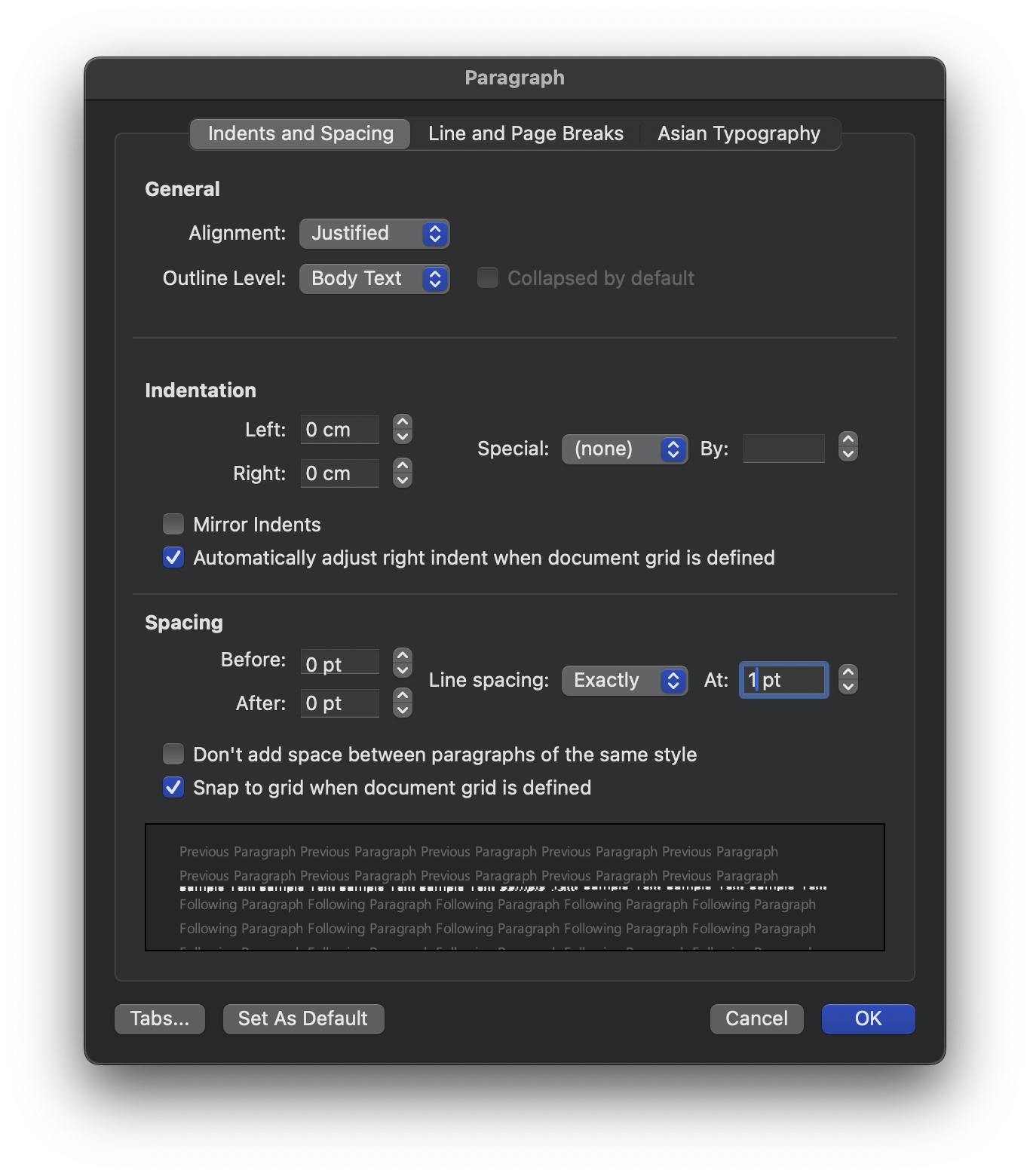
<li class="">Select the ¶ symbol → right-click → Paragraph</li>
<li class="">Line Spacing: <code>Exactly</code> / <code>1pt</code></li>
<li class="">Before / After: <code>0pt</code></li>
<li class="">Go to the Line and Page Breaks tab and uncheck all of the following:
<ul>
<li class="">Keep with next</li>
<li class="">Keep lines together</li>
<li class="">Page break before</li>
</ul>
</li>
</ol>
<h4 class="anchor anchorTargetStickyNavbar_Vzrq" id="method-3-reduce-page-margins">Method 3. Reduce Page Margins<a href="https://blog.l4n14ke4.dev/en/troubleshooting/word-blank-page-wont-delete#method-3-reduce-page-margins" class="hash-link" aria-label="Direct link to Method 3. Reduce Page Margins" title="Direct link to Method 3. Reduce Page Margins" translate="no">​</a></h4>
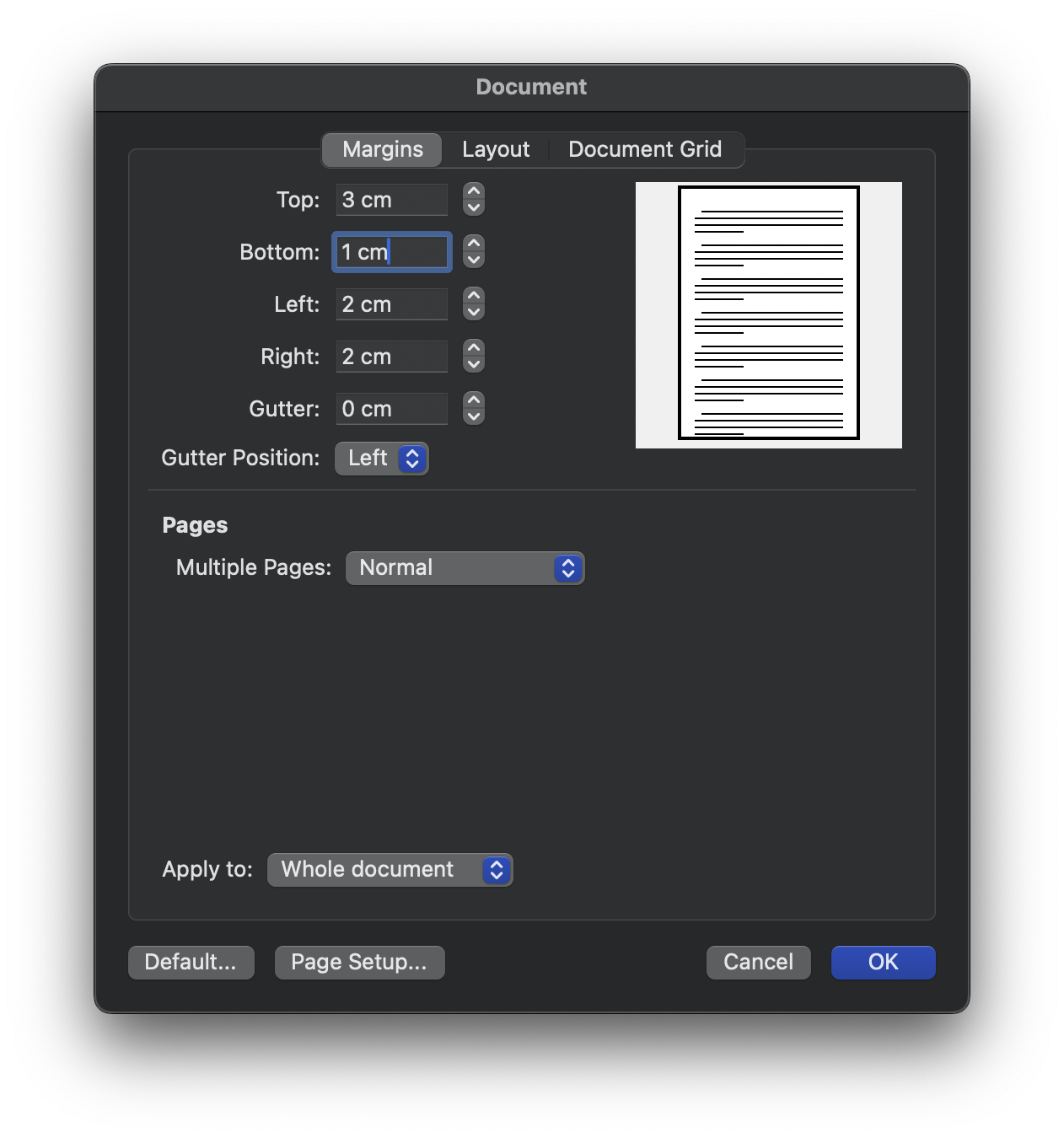
<p><img decoding="async" loading="lazy" alt="margins.png" src="https://blog.l4n14ke4.dev/en/assets/images/margins-208dab0232167fcb766ecbc850280b3e.png" width="1262" height="1350" class="img_ev3q"></p>
<ol>
<li class="">On the page just before the blank page, go to Layout → Margins → Custom Margins</li>
<li class="">Reduce the Bottom margin. (I reduced mine from 3pt to 1pt.)</li>
</ol>
<h2 class="anchor anchorTargetStickyNavbar_Vzrq" id="if-youre-exporting-to-pdf">If You're Exporting to PDF<a href="https://blog.l4n14ke4.dev/en/troubleshooting/word-blank-page-wont-delete#if-youre-exporting-to-pdf" class="hash-link" aria-label="Direct link to If You're Exporting to PDF" title="Direct link to If You're Exporting to PDF" translate="no">​</a></h2>
<h3 class="anchor anchorTargetStickyNavbar_Vzrq" id="method-1-print-to-pdf">Method 1. Print to PDF<a href="https://blog.l4n14ke4.dev/en/troubleshooting/word-blank-page-wont-delete#method-1-print-to-pdf" class="hash-link" aria-label="Direct link to Method 1. Print to PDF" title="Direct link to Method 1. Print to PDF" translate="no">​</a></h3>
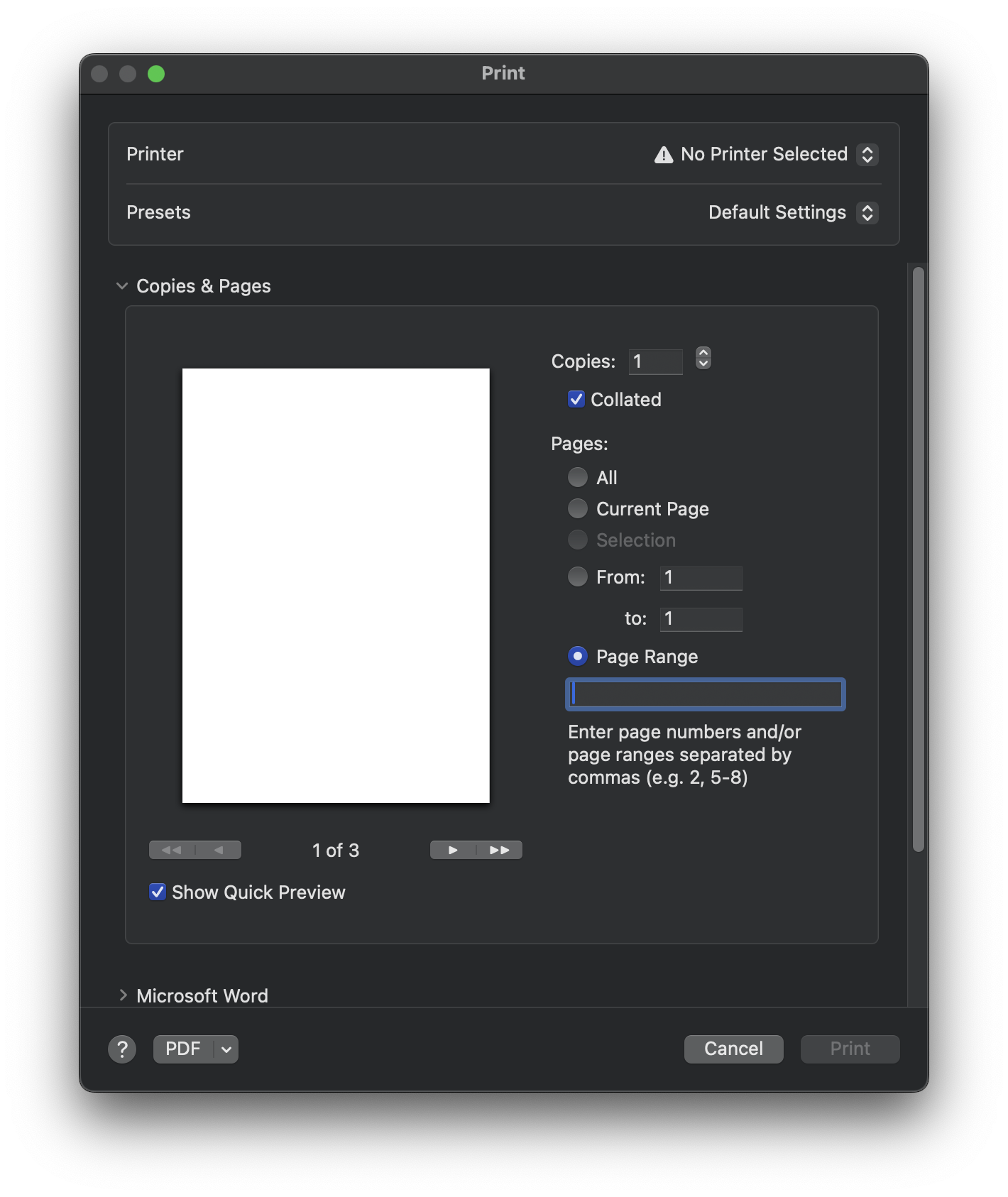
<p><img decoding="async" loading="lazy" alt="pdf.png" src="https://blog.l4n14ke4.dev/en/assets/images/pdf-7f5fddae109b8fa39d60b5e1be77d767.png" width="1420" height="1686" class="img_ev3q"></p>
<ol>
<li class="">File → Print (Mac: <code>Command</code> + <code>P</code> / Windows: <code>Ctrl</code> + <code>P</code>)</li>
<li class="">Specify the page range, excluding the blank page</li>
<li class="">Set the file format to PDF and save</li>
</ol>
<h3 class="anchor anchorTargetStickyNavbar_Vzrq" id="method-2-save-as">Method 2. Save As<a href="https://blog.l4n14ke4.dev/en/troubleshooting/word-blank-page-wont-delete#method-2-save-as" class="hash-link" aria-label="Direct link to Method 2. Save As" title="Direct link to Method 2. Save As" translate="no">​</a></h3>
<p>File → Save As → Browse → set file format to PDF</p>
<p>This method is not supported on Mac, so no screenshot is included.</p>
<h2 class="anchor anchorTargetStickyNavbar_Vzrq" id="conclusion">Conclusion<a href="https://blog.l4n14ke4.dev/en/troubleshooting/word-blank-page-wont-delete#conclusion" class="hash-link" aria-label="Direct link to Conclusion" title="Direct link to Conclusion" translate="no">​</a></h2>
<p>In Word, blank pages can't be deleted directly — the solution is to hide the paragraph mark inside the previous page. Not knowing this caused me real trouble during document submission. Definitely something to remember.</p>
<h2 class="anchor anchorTargetStickyNavbar_Vzrq" id="references">References<a href="https://blog.l4n14ke4.dev/en/troubleshooting/word-blank-page-wont-delete#references" class="hash-link" aria-label="Direct link to References" title="Direct link to References" translate="no">​</a></h2>
<div class="remark-link-card-plus__container">
  <a href="https://learn.microsoft.com/en-us/answers/questions/5012423/can-not-delete-blank-page-at-the-end-of-a-document" target="_blank" rel="noreferrer noopener" class="remark-link-card-plus__card">
    <div class="remark-link-card-plus__main">
  <div class="remark-link-card-plus__content">
    <div class="remark-link-card-plus__title">Can not delete blank page at the end of a document in MS Word 365 (urgent help!) - Microsoft Q&amp;A</div>
    <div class="remark-link-card-plus__description">I got a 2 pages document (Resume in Japanese) but there is an extra blank page at the end which makes total 3 pages.
I have tried to delete the blank page by reading some hints form MS support website, watching YouTube videos but no avail.
I have tried…</div>
  </div>
  <div class="remark-link-card-plus__meta">
    <img decoding="async" loading="lazy" src="https://www.google.com/s2/favicons?domain=learn.microsoft.com" class="remark-link-card-plus__favicon img_ev3q" width="14" height="14" alt="">
    <span class="remark-link-card-plus__url">learn.microsoft.com</span>
  </div>
</div>
<div class="remark-link-card-plus__thumbnail">
  <img decoding="async" loading="lazy" src="https://learn.microsoft.com/en-us/media/open-graph-image.png" class="remark-link-card-plus__image img_ev3q" alt="">
</div>
  </a>
</div>
<div class="remark-link-card-plus__container">
  <a href="https://support.microsoft.com/en-us/office/delete-a-blank-page-a5efa26e-6a21-4ac8-81ce-220a46d105a8" target="_blank" rel="noreferrer noopener" class="remark-link-card-plus__card">
    <div class="remark-link-card-plus__main">
  <div class="remark-link-card-plus__content">
    <div class="remark-link-card-plus__title">Delete a blank page | Microsoft Support</div>
    <div class="remark-link-card-plus__description">Learn how to delete a page in Word with ease using our step-by-step guide. Say goodbye to blank pages in your documents today! Read more now.</div>
  </div>
  <div class="remark-link-card-plus__meta">
    <img decoding="async" loading="lazy" src="https://support.microsoft.com/favicon-32x32.png" class="remark-link-card-plus__favicon img_ev3q" width="14" height="14" alt="">
    <span class="remark-link-card-plus__url">support.microsoft.com</span>
  </div>
</div>
<div class="remark-link-card-plus__thumbnail">
  <img decoding="async" loading="lazy" src="https://uhf.microsoft.com/images/microsoft/RE1Mu3b.png" class="remark-link-card-plus__image img_ev3q" alt="">
</div>
  </a>
</div>]]></content>
        <author>
            <name>L4N14KE4</name>
            <uri>https://github.com/L4N14KE4</uri>
        </author>
        <category label="word" term="word"/>
        <category label="Troubleshooting" term="Troubleshooting"/>
    </entry>
    <entry>
        <title type="html"><![CDATA[AI Scraping Concerns Put the Web Archive at Risk]]></title>
        <id>https://blog.l4n14ke4.dev/en/digital-archiving/internet-archive-at-risk-ai-scraping</id>
        <link href="https://blog.l4n14ke4.dev/en/digital-archiving/internet-archive-at-risk-ai-scraping"/>
        <updated>2026-03-18T00:00:00.000Z</updated>
        <summary type="html"><![CDATA[Major news publishers have started blocking the Wayback Machine over fears of AI training data collection. The Internet Archive argues this will erase public historical records, not stop AI.]]></summary>
        <content type="html"><![CDATA[<p>Major news publishers have started blocking the Wayback Machine over fears of AI training data collection. The Internet Archive argues this will erase public historical records, not stop AI.</p>
<p><img decoding="async" loading="lazy" alt="internet-archive-at-risk-en.jpg" src="https://blog.l4n14ke4.dev/en/assets/images/internet-archive-at-risk-en-d66af24f101659b6c5d7bb830b8e25f2.jpg" width="14173" height="7441" class="img_ev3q"></p>
<h2 class="anchor anchorTargetStickyNavbar_Vzrq" id="tldr">TL;DR<a href="https://blog.l4n14ke4.dev/en/digital-archiving/internet-archive-at-risk-ai-scraping#tldr" class="hash-link" aria-label="Direct link to TL;DR" title="Direct link to TL;DR" translate="no">​</a></h2>
<p>Major news publishers have begun blocking the Internet Archive's (Wayback Machine) crawler, citing concerns over unauthorized AI training data collection. The Internet Archive contends that it is a public digital library — not an AI scraping tool — and warns that these blocks will result in the loss of historical records.</p>
<hr>
<p>This post is a summary and review of two articles from Nieman Lab and Techdirt.
You can read the full article via the link below.</p>
<ol>
<li class="">Nieman Lab, "News publishers limit Internet Archive access due to AI scraping concerns"</li>
</ol>
<div class="remark-link-card-plus__container">
  <a href="https://www.niemanlab.org/2026/01/news-publishers-limit-internet-archive-access-due-to-ai-scraping-concerns" target="_blank" rel="noreferrer noopener" class="remark-link-card-plus__card">
    <div class="remark-link-card-plus__main">
  <div class="remark-link-card-plus__content">
    <div class="remark-link-card-plus__title">News publishers limit Internet Archive access due to AI scraping concerns</div>
    <div class="remark-link-card-plus__description">Outlets like The Guardian and The New York Times are scrutinizing digital archives as potential backdoors for AI crawlers.</div>
  </div>
  <div class="remark-link-card-plus__meta">
    <img decoding="async" loading="lazy" src="https://www.google.com/s2/favicons?domain=www.niemanlab.org" class="remark-link-card-plus__favicon img_ev3q" width="14" height="14" alt="">
    <span class="remark-link-card-plus__url">www.niemanlab.org</span>
  </div>
</div>
<div class="remark-link-card-plus__thumbnail">
  <img decoding="async" loading="lazy" src="https://www.niemanlab.org/images/internt-archive-stock-2-700x467.jpg" class="remark-link-card-plus__image img_ev3q" alt="">
</div>
  </a>
</div>
<ol start="2">
<li class="">Techdirt, "Preserving The Web Is Not The Problem. Losing It Is."</li>
</ol>
<div class="remark-link-card-plus__container">
  <a href="https://www.techdirt.com/2026/02/17/preserving-the-web-is-not-the-problem-losing-it-is/" target="_blank" rel="noreferrer noopener" class="remark-link-card-plus__card">
    <div class="remark-link-card-plus__main">
  <div class="remark-link-card-plus__content">
    <div class="remark-link-card-plus__title">Preserving The Web Is Not The Problem. Losing It Is.</div>
    <div class="remark-link-card-plus__description">Recent reporting by Nieman Lab describes how some major news organizations—including The Guardian, The New York Times, and Reddit—are limiting or blocking access to their content in the Internet Ar…</div>
  </div>
  <div class="remark-link-card-plus__meta">
    <img decoding="async" loading="lazy" src="https://i0.wp.com/www.techdirt.com/wp-content/uploads/2022/02/cropped-techdirt-square-512x512-1.png?fit=32%2C32&amp;ssl=1" class="remark-link-card-plus__favicon img_ev3q" width="14" height="14" alt="">
    <span class="remark-link-card-plus__url">www.techdirt.com</span>
  </div>
</div>
<div class="remark-link-card-plus__thumbnail">
  <img decoding="async" loading="lazy" src="https://www.techdirt.com/wp-content/themes/techdirt/assets/images/td-rect-logo-white.png" class="remark-link-card-plus__image img_ev3q" alt="">
</div>
  </a>
</div>
<hr>
<h2 class="anchor anchorTargetStickyNavbar_Vzrq" id="publishers-limiting-access-nieman-lab">Publishers Limiting Access (Nieman Lab)<a href="https://blog.l4n14ke4.dev/en/digital-archiving/internet-archive-at-risk-ai-scraping#publishers-limiting-access-nieman-lab" class="hash-link" aria-label="Direct link to Publishers Limiting Access (Nieman Lab)" title="Direct link to Publishers Limiting Access (Nieman Lab)" translate="no">​</a></h2>
<p>As AI bots scavenge the web for training data, the Internet Archive's commitment to free information access has turned its digital library into a potential liability for some news publishers.</p>
<p>The Guardian found through its access logs that the Internet Archive was a frequent crawler of its content. It subsequently took steps to exclude itself from the Internet Archive's APIs and filter out its article pages from the Wayback Machine's URL interface. Robert Hahn, head of business affairs and licensing, stated: "A lot of these AI businesses are looking for readily available, structured databases of content. The Internet Archive's API would have been an obvious place to plug their own machines into and suck out the IP." That said, The Guardian stopped short of a full block, citing support for the nonprofit's mission to democratize information.</p>
<p>The New York Times confirmed it is actively "hard blocking" the Internet Archive's crawlers. By end of 2025, it had added <code>archive.org_bot</code> to its <code>robots.txt</code> file. A Times spokesperson said: "We are blocking the Internet Archive's bot from accessing the Times because the Wayback Machine provides unfettered access to Times content — including by AI companies — without authorization." The Financial Times and Reddit took similar measures; Reddit stated it had confirmed instances where AI companies violated platform policies by scraping data from the Wayback Machine.</p>
<p>Nieman Lab analyzed the <code>robots.txt</code> files of 1,167 news sites (exploratory data; 76% of sites are U.S.-based) and found that 241 sites across nine countries explicitly disallow at least one of the Internet Archive's four crawling bots. 87% of those sites are owned by USA Today Co. (formerly Gannett), which implemented the blocks across its properties in 2025. Of the 241 sites, 240 also disallow Common Crawl — another nonprofit web preservation project — suggesting the blocking trend extends beyond the Internet Archive alone.</p>
<p>Internet Archive founder Brewster Kahle warned that "if publishers limit libraries, like the Internet Archive, then the public will have less access to the historical record." Robert Hahn acknowledged the situation as "the law of unintended consequences: You do something for really good purposes, and it gets abused."<sup><a href="https://blog.l4n14ke4.dev/en/digital-archiving/internet-archive-at-risk-ai-scraping#user-content-fn-1-a233f7" id="user-content-fnref-1-a233f7" data-footnote-ref="" aria-describedby="footnote-label" class="anchorTargetStickyNavbar_Vzrq">1</a></sup></p>
<h2 class="anchor anchorTargetStickyNavbar_Vzrq" id="the-internet-archives-pushback-techdirt">The Internet Archive's Pushback (Techdirt)<a href="https://blog.l4n14ke4.dev/en/digital-archiving/internet-archive-at-risk-ai-scraping#the-internet-archives-pushback-techdirt" class="hash-link" aria-label="Direct link to The Internet Archive's Pushback (Techdirt)" title="Direct link to The Internet Archive's Pushback (Techdirt)" translate="no">​</a></h2>
<p>In response, Wayback Machine Director Mark Graham wrote in Techdirt that publishers' concerns were "understandable, but unfounded." He emphasized that the Wayback Machine is a 501(c)(3) nonprofit public library and a federally designated library of record that has been operating since 1996 — not a tool designed for large-scale commercial scraping. He noted that the Internet Archive actively prevents malicious access through rate limiting, filtering, and monitoring, and responds promptly when new scraping patterns are detected.</p>
<p>Graham identified the consequences of blocking as the more serious problem. If the archive is cut off, the public loses access to historical records, journalists lose a tool for fact-checking past content, and researchers lose primary digital sources. Techdirt's tech policy writer Mike Masnick warned that if quality journalism is removed from the archive, "the historical record will be skewed against quality journalism."</p>
<p>The Internet Archive added that it is currently working with publishers to find technical solutions that address their concerns without erasing the historical record.<sup><a href="https://blog.l4n14ke4.dev/en/digital-archiving/internet-archive-at-risk-ai-scraping#user-content-fn-2-a233f7" id="user-content-fnref-2-a233f7" data-footnote-ref="" aria-describedby="footnote-label" class="anchorTargetStickyNavbar_Vzrq">2</a></sup></p>
<hr>
<h2 class="anchor anchorTargetStickyNavbar_Vzrq" id="comment">Comment<a href="https://blog.l4n14ke4.dev/en/digital-archiving/internet-archive-at-risk-ai-scraping#comment" class="hash-link" aria-label="Direct link to Comment" title="Direct link to Comment" translate="no">​</a></h2>
<p>Both sides have their own logic. That said, for publishers, the motivation may involve not just AI scraping concerns but also the very real interest in maintaining their paywalls.</p>
<p>The effectiveness of these measures is also questionable. AI companies operating large IP pools cannot realistically be stopped by <code>robots.txt</code> alone — the file carries no legal enforcement power, and there are various workarounds such as ignoring it outright or spoofing the User-Agent header. The ones most likely to be harmed by these blocks are not AI companies, but everyday users and researchers who rely on the archive for study and documentation purposes. In fact, it was only after coming across this issue that I understood why Wayback Machine wasn't properly capturing Reddit pages with comments intact.</p>
<p>Personally, I stand on the side of the Internet Archive. While major publishers' content is unlikely to disappear in the short term, there is simply no adequate substitute for a single space where scattered materials can be accessed chronologically. I hope both sides reach a reasonable solution before this trend spreads to more publishers — and that the Internet Archive continues to exist as an open preservation space for everyone.</p>
<h2 class="anchor anchorTargetStickyNavbar_Vzrq" id="further-reading">Further Reading<a href="https://blog.l4n14ke4.dev/en/digital-archiving/internet-archive-at-risk-ai-scraping#further-reading" class="hash-link" aria-label="Direct link to Further Reading" title="Direct link to Further Reading" translate="no">​</a></h2>
<p>For additional perspectives on this issue, the following resources are recommended.</p>
<ul>
<li class="">Reddit — r/Archivists : Reactions and on-the-ground opinions from the archivist community.</li>
</ul>
<div class="remark-link-card-plus__container">
  <a href="https://www.reddit.com/r/Archivists/comments/1r8980v/internet_archive_response_to_major_sites_blocking/" target="_blank" rel="noreferrer noopener" class="remark-link-card-plus__card">
    <div class="remark-link-card-plus__main">
  <div class="remark-link-card-plus__content">
    <div class="remark-link-card-plus__title">Reddit</div>
    <div class="remark-link-card-plus__description"></div>
  </div>
  <div class="remark-link-card-plus__meta">
    <img decoding="async" loading="lazy" src="https://www.google.com/s2/favicons?domain=www.reddit.com" class="remark-link-card-plus__favicon img_ev3q" width="14" height="14" alt="">
    <span class="remark-link-card-plus__url">www.reddit.com</span>
  </div>
</div>
  </a>
</div>
<ul>
<li class="">EFF (Electronic Frontier Foundation) : Taking a similar stance to the Techdirt piece, the EFF argues that blocking the Internet Archive does not stop AI — it erases the web's historical record.</li>
</ul>
<div class="remark-link-card-plus__container">
  <a href="https://www.eff.org/deeplinks/2026/03/blocking-internet-archive-wont-stop-ai-it-will-erase-webs-historical-record" target="_blank" rel="noreferrer noopener" class="remark-link-card-plus__card">
    <div class="remark-link-card-plus__main">
  <div class="remark-link-card-plus__content">
    <div class="remark-link-card-plus__title">Blocking the Internet Archive Won’t Stop AI, But It Will Erase the Web’s Historical Record</div>
    <div class="remark-link-card-plus__description">Imagine a newspaper publisher announcing it will no longer allow libraries to keep copies of its paper. That’s effectively what’s begun happening online in the last few months. The Internet Archive—the world’s largest digital library—has preserved newspapers since it went online in the mid-1990s....</div>
  </div>
  <div class="remark-link-card-plus__meta">
    <img decoding="async" loading="lazy" src="https://www.eff.org/sites/all/themes/frontier/favicon.ico" class="remark-link-card-plus__favicon img_ev3q" width="14" height="14" alt="">
    <span class="remark-link-card-plus__url">www.eff.org</span>
  </div>
</div>
<div class="remark-link-card-plus__thumbnail">
  <img decoding="async" loading="lazy" src="https://www.eff.org/files/banner_library/internet-archive-servers-by-jason-scott.jpg" class="remark-link-card-plus__image img_ev3q" alt="">
</div>
  </a>
</div>
<!-- -->
<section data-footnotes="" class="footnotes"><h2 class="anchor anchorTargetStickyNavbar_Vzrq sr-only" id="footnote-label">Footnotes<a href="https://blog.l4n14ke4.dev/en/digital-archiving/internet-archive-at-risk-ai-scraping#footnote-label" class="hash-link" aria-label="Direct link to Footnotes" title="Direct link to Footnotes" translate="no">​</a></h2>
<ol>
<li class="anchorTargetStickyNavbar_Vzrq" id="user-content-fn-1-a233f7">
<p>News publishers limit Internet Archive access due to AI scraping concerns - Nieman Lab, 2026.01.18, <a href="https://www.niemanlab.org/2026/01/news-publishers-limit-internet-archive-access-due-to-ai-scraping-concerns/" target="_blank" rel="noopener noreferrer" class="">https://www.niemanlab.org/2026/01/news-publishers-limit-internet-archive-access-due-to-ai-scraping-concerns/</a> (Accessed: 2026.03.12) <a href="https://web.archive.org/web/20260309153138/https://www.niemanlab.org/2026/01/news-publishers-limit-internet-archive-access-due-to-ai-scraping-concerns/" target="_blank" rel="noopener noreferrer" class="">[Archive]</a> <a href="https://blog.l4n14ke4.dev/en/digital-archiving/internet-archive-at-risk-ai-scraping#user-content-fnref-1-a233f7" data-footnote-backref="" aria-label="Back to reference 1" class="data-footnote-backref">↩</a></p>
</li>
<li class="anchorTargetStickyNavbar_Vzrq" id="user-content-fn-2-a233f7">
<p>Preserving The Web Is Not The Problem. Losing It Is. — Techdirt, 2026.02.17, <a href="https://www.techdirt.com/2026/02/17/preserving-the-web-is-not-the-problem-losing-it-is/" target="_blank" rel="noopener noreferrer" class="">https://www.techdirt.com/2026/02/17/preserving-the-web-is-not-the-problem-losing-it-is/</a> (Accessed: 2026.03.08) <a href="https://web.archive.org/web/20260308090005/https://www.techdirt.com/2026/02/17/preserving-the-web-is-not-the-problem-losing-it-is/" target="_blank" rel="noopener noreferrer" class="">[Archive]</a> <a href="https://blog.l4n14ke4.dev/en/digital-archiving/internet-archive-at-risk-ai-scraping#user-content-fnref-2-a233f7" data-footnote-backref="" aria-label="Back to reference 2" class="data-footnote-backref">↩</a></p>
</li>
</ol>
</section>]]></content>
        <author>
            <name>L4N14KE4</name>
            <uri>https://github.com/L4N14KE4</uri>
        </author>
        <category label="Internet Archive" term="Internet Archive"/>
    </entry>
    <entry>
        <title type="html"><![CDATA[Resolving Chrome Browser "Blocked by an Extension" Permission Issue]]></title>
        <id>https://blog.l4n14ke4.dev/en/troubleshooting/resolve-blocked-by-an-extension-error</id>
        <link href="https://blog.l4n14ke4.dev/en/troubleshooting/resolve-blocked-by-an-extension-error"/>
        <updated>2026-01-30T00:00:00.000Z</updated>
        <summary type="html"><![CDATA[Let's resolve the "Blocked by an extension" permission issue in Chrome browser.]]></summary>
        <content type="html"><![CDATA[<p>Let's resolve the "Blocked by an extension" permission issue in Chrome browser.</p>
<p><img decoding="async" loading="lazy" alt="chrome-blocked-by-extension-en.jpg" src="https://blog.l4n14ke4.dev/en/assets/images/chrome-blocked-by-extension-en-0349da370767adc959fa258e65157090.jpg" width="14173" height="7441" class="img_ev3q"></p>
<h2 class="anchor anchorTargetStickyNavbar_Vzrq" id="tldr">TL;DR<a href="https://blog.l4n14ke4.dev/en/troubleshooting/resolve-blocked-by-an-extension-error#tldr" class="hash-link" aria-label="Direct link to TL;DR" title="Direct link to TL;DR" translate="no">​</a></h2>
<p>All site permissions in Chrome were locked as "Blocked by an extension", and disabling extensions and resetting settings didn't fix it.</p>
<p>Cause: Corrupted settings in a specific profile</p>
<p>Solution: Rename problem profile folder → Restart Chrome → New profile auto-created → Restore via Google account sync</p>
<hr>
<h2 class="anchor anchorTargetStickyNavbar_Vzrq" id="symptom-all-permissions-suddenly-locked">Symptom: All Permissions Suddenly Locked<a href="https://blog.l4n14ke4.dev/en/troubleshooting/resolve-blocked-by-an-extension-error#symptom-all-permissions-suddenly-locked" class="hash-link" aria-label="Direct link to Symptom: All Permissions Suddenly Locked" title="Direct link to Symptom: All Permissions Suddenly Locked" translate="no">​</a></h2>
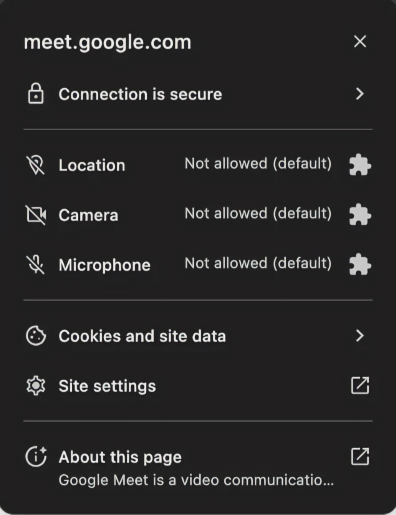
<p>I tried to join a video meeting on Google Meet using my default profile, but camera, microphone, and location permissions were all locked as "Blocked by an extension". Upon inspection, I discovered that <strong>camera, microphone, and location permissions for all sites were locked</strong>.</p>
<p><img decoding="async" loading="lazy" alt="meet_no_access.png" src="https://blog.l4n14ke4.dev/en/assets/images/meet_no_access-b967b6bb1e026f59ac3f4a1993ed0a77.png" width="396" height="515" class="img_ev3q"></p>
<p>Looking at the site settings screen, location, camera, and microphone items were all grayed out and disabled, with a message "Blocked by an extension" displayed below each item. Even when clicking the dropdown, only "Block" was selectable, and I couldn't change it to "Allow".</p>
<p>I found that there were similar cases to mine.</p>
<div class="remark-link-card-plus__container">
  <a href="https://forum.vivaldi.net/topic/100029/unable-to-change-website-permissions" target="_blank" rel="noreferrer noopener" class="remark-link-card-plus__card">
    <div class="remark-link-card-plus__main">
  <div class="remark-link-card-plus__content">
    <div class="remark-link-card-plus__title">Unable to change website permissions</div>
    <div class="remark-link-card-plus__description">Hi y'all, Hope you can help - until recently, about a month or two ago, I did not have this issue, but after that, I am no longer able to do conversations vi...</div>
  </div>
  <div class="remark-link-card-plus__meta">
    <img decoding="async" loading="lazy" src="https://forum.vivaldi.net/assets/plugins/nodebb-theme-vivaldi/images/favicon-256x256.png?v=4fdad4d85b9" class="remark-link-card-plus__favicon img_ev3q" width="14" height="14" alt="">
    <span class="remark-link-card-plus__url">forum.vivaldi.net</span>
  </div>
</div>
<div class="remark-link-card-plus__thumbnail">
  <img decoding="async" loading="lazy" src="https://forum.vivaldi.net/assets/uploads/files/1722865734554-valdi_messenger-permissions.png" class="remark-link-card-plus__image img_ev3q" alt="">
</div>
  </a>
</div>
<hr>
<h2 class="anchor anchorTargetStickyNavbar_Vzrq" id="tracking-the-cause">Tracking the Cause<a href="https://blog.l4n14ke4.dev/en/troubleshooting/resolve-blocked-by-an-extension-error#tracking-the-cause" class="hash-link" aria-label="Direct link to Tracking the Cause" title="Direct link to Tracking the Cause" translate="no">​</a></h2>
<h3 class="anchor anchorTargetStickyNavbar_Vzrq" id="step-1-disable-extensions">Step 1: Disable Extensions<a href="https://blog.l4n14ke4.dev/en/troubleshooting/resolve-blocked-by-an-extension-error#step-1-disable-extensions" class="hash-link" aria-label="Direct link to Step 1: Disable Extensions" title="Direct link to Step 1: Disable Extensions" translate="no">​</a></h3>
<p>Since it said "Blocked by an extension", I naturally assumed it was due to an extension. I started disabling extensions one by one, and eventually <strong>disabled all extensions</strong>.</p>
<p>However, even after restarting Chrome, the situation remained the same. The site permission screen still showed "Blocked by an extension".</p>
<h3 class="anchor anchorTargetStickyNavbar_Vzrq" id="step-2-reset-chrome-settings">Step 2: Reset Chrome Settings<a href="https://blog.l4n14ke4.dev/en/troubleshooting/resolve-blocked-by-an-extension-error#step-2-reset-chrome-settings" class="hash-link" aria-label="Direct link to Step 2: Reset Chrome Settings" title="Direct link to Step 2: Reset Chrome Settings" translate="no">​</a></h3>
<p>Since disabling extensions didn't work, I judged that there was a problem with the settings themselves.</p>
<p>I clicked the "Reset permissions" button in site settings and deleted cookies and site data as well.</p>
<p>The problem still wasn't resolved, so I went to <code>chrome://settings/reset</code> and completely reset Chrome settings.</p>
<p>I completely closed and restarted Chrome, but the same problem still occurred on all sites.</p>
<h3 class="anchor anchorTargetStickyNavbar_Vzrq" id="step-3-check-other-profiles">Step 3: Check Other Profiles<a href="https://blog.l4n14ke4.dev/en/troubleshooting/resolve-blocked-by-an-extension-error#step-3-check-other-profiles" class="hash-link" aria-label="Direct link to Step 3: Check Other Profiles" title="Direct link to Step 3: Check Other Profiles" translate="no">​</a></h3>
<p>At this point, I thought there was something fundamentally wrong. I tested by switching to another Chrome profile, and <strong>all permissions worked normally in that profile</strong>.</p>
<p>Now the scope of the problem narrowed. It wasn't a problem with the browser itself, but <strong>a problem occurring only in a specific profile</strong>.</p>
<h3 class="anchor anchorTargetStickyNavbar_Vzrq" id="step-4-look-for-hidden-policies-or-extensions">Step 4: Look for Hidden Policies or Extensions<a href="https://blog.l4n14ke4.dev/en/troubleshooting/resolve-blocked-by-an-extension-error#step-4-look-for-hidden-policies-or-extensions" class="hash-link" aria-label="Direct link to Step 4: Look for Hidden Policies or Extensions" title="Direct link to Step 4: Look for Hidden Policies or Extensions" translate="no">​</a></h3>
<p>The fact that "Blocked by an extension" appeared even after disabling all extensions could be due to <strong>hidden policy-based extensions or organization management settings</strong>, according to posts I found.</p>
<p>I went to <code>chrome://system</code> and checked the Extensions section. Only Google's default extensions (Network Speech, Hangouts, etc.) were visible, and there were no suspicious items.</p>
<p>I also checked <code>chrome://policy</code>. Both Chrome Policies and Policy Precedence showed "No policies set". There were no policies distributed by any organization or company.</p>
<h3 class="anchor anchorTargetStickyNavbar_Vzrq" id="profile-corruption">Profile Corruption?<a href="https://blog.l4n14ke4.dev/en/troubleshooting/resolve-blocked-by-an-extension-error#profile-corruption" class="hash-link" aria-label="Direct link to Profile Corruption?" title="Direct link to Profile Corruption?" translate="no">​</a></h3>
<p>No extensions, no policies, settings reset, but still not fixed. Other profiles are fine.</p>
<p>I concluded that <strong>the profile's settings file itself was corrupted, causing content settings values to be abnormally fixed</strong>.</p>
<hr>
<h2 class="anchor anchorTargetStickyNavbar_Vzrq" id="solution-reset-profile-folder">Solution: Reset Profile Folder<a href="https://blog.l4n14ke4.dev/en/troubleshooting/resolve-blocked-by-an-extension-error#solution-reset-profile-folder" class="hash-link" aria-label="Direct link to Solution: Reset Profile Folder" title="Direct link to Solution: Reset Profile Folder" translate="no">​</a></h2>
<div class="theme-admonition theme-admonition-warning admonition_xJq3 alert alert--warning"><div class="admonitionHeading_Gvgb"><span class="admonitionIcon_Rf37"><svg viewBox="0 0 16 16"><path fill-rule="evenodd" d="M8.893 1.5c-.183-.31-.52-.5-.887-.5s-.703.19-.886.5L.138 13.499a.98.98 0 0 0 0 1.001c.193.31.53.501.886.501h13.964c.367 0 .704-.19.877-.5a1.03 1.03 0 0 0 .01-1.002L8.893 1.5zm.133 11.497H6.987v-2.003h2.039v2.003zm0-3.004H6.987V5.987h2.039v4.006z"></path></svg></span>warning</div><div class="admonitionContent_BuS1"><p>Since Chrome returns to its initial installation state, if you have extensions, bookmarks, or saved passwords, back them up through Google account login, etc.</p></div></div>
<p>I followed the solution posted in Google Chrome Help Community for a similar problem.<sup><a href="https://blog.l4n14ke4.dev/en/troubleshooting/resolve-blocked-by-an-extension-error#user-content-fn-1-1edb5b" id="user-content-fnref-1-1edb5b" data-footnote-ref="" aria-describedby="footnote-label" class="anchorTargetStickyNavbar_Vzrq">1</a></sup></p>
<h3 class="anchor anchorTargetStickyNavbar_Vzrq" id="step-1-navigate-to-profile-path">Step 1: Navigate to Profile Path<a href="https://blog.l4n14ke4.dev/en/troubleshooting/resolve-blocked-by-an-extension-error#step-1-navigate-to-profile-path" class="hash-link" aria-label="Direct link to Step 1: Navigate to Profile Path" title="Direct link to Step 1: Navigate to Profile Path" translate="no">​</a></h3>
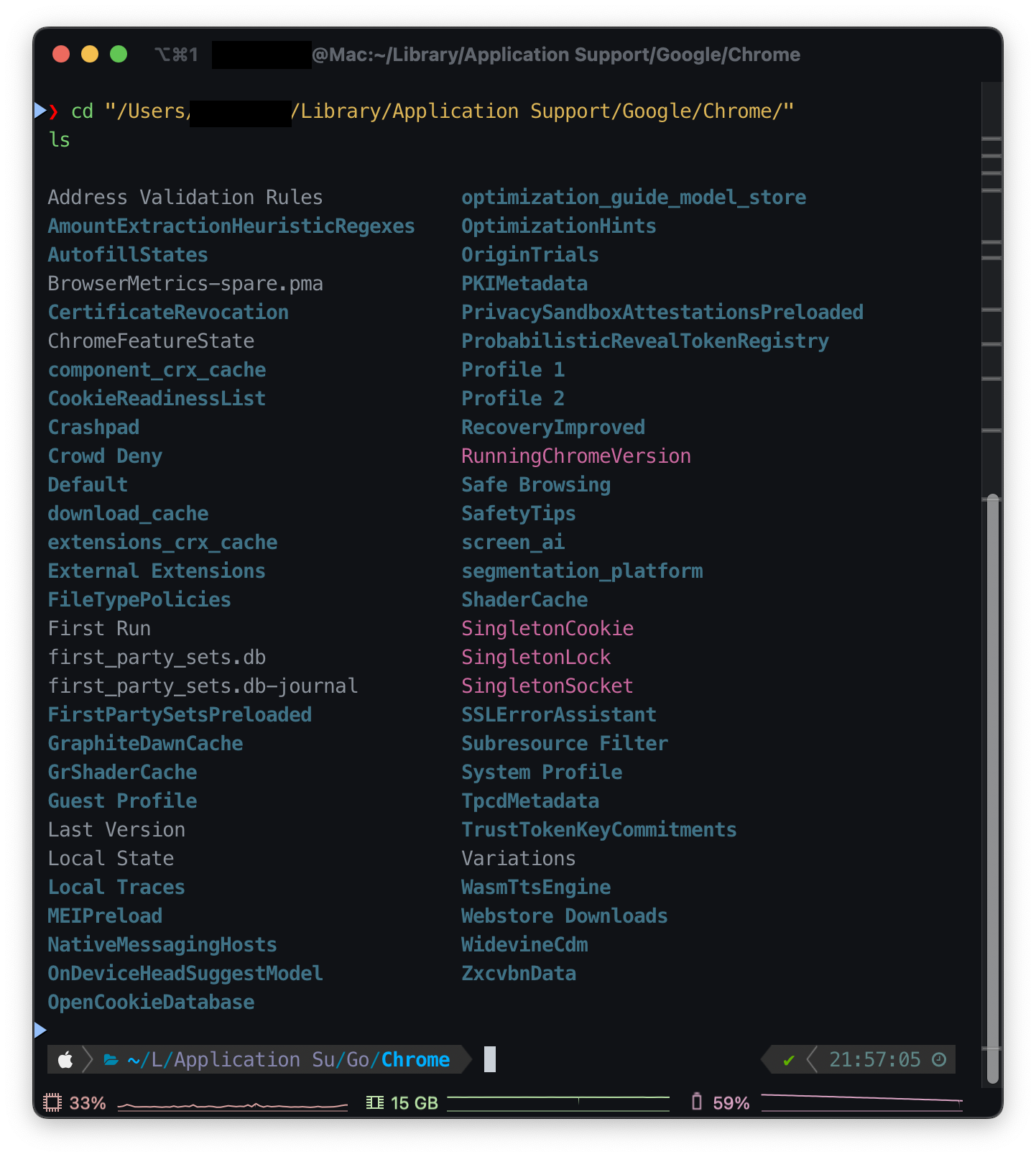
<p>I entered <code>chrome://version</code> in the address bar. There was a <code>Profile Path</code> item about halfway down the page.<sup><a href="https://blog.l4n14ke4.dev/en/troubleshooting/resolve-blocked-by-an-extension-error#user-content-fn-2-1edb5b" id="user-content-fnref-2-1edb5b" data-footnote-ref="" aria-describedby="footnote-label" class="anchorTargetStickyNavbar_Vzrq">2</a></sup></p>
<div class="language-bash codeBlockContainer_Ckt0 theme-code-block" style="--prism-color:#393A34;--prism-background-color:#f6f8fa"><div class="codeBlockContent_QJqH"><pre tabindex="0" class="prism-code language-bash codeBlock_bY9V thin-scrollbar" style="color:#393A34;background-color:#f6f8fa"><code class="codeBlockLines_e6Vv"><span class="token-line" style="color:#393A34"><span class="token plain">/Users/[Username]/Library/Application Support/Google/Chrome/Default</span><br></span></code></pre></div></div>
<p>This confirmed that the currently used profile was the <code>Default</code> folder.</p>
<p><strong>Mac</strong></p>
<p>On macOS, the <code>~/Library</code> folder is hidden and not immediately visible in Finder. There are various ways to access it, but I used Terminal.</p>
<p><strong>Windows</strong></p>
<p>Press <code>Win</code> + <code>R</code> to open the Run dialog, access <code>%localappdata%</code>, then find <code>Google\Chrome\User Data</code>.</p>
<p><img decoding="async" loading="lazy" alt="chrome_directory.png" src="https://blog.l4n14ke4.dev/en/assets/images/chrome_directory-3f05920187e0e338e47d9ee078c614fd.png" width="1442" height="1610" class="img_ev3q"></p>
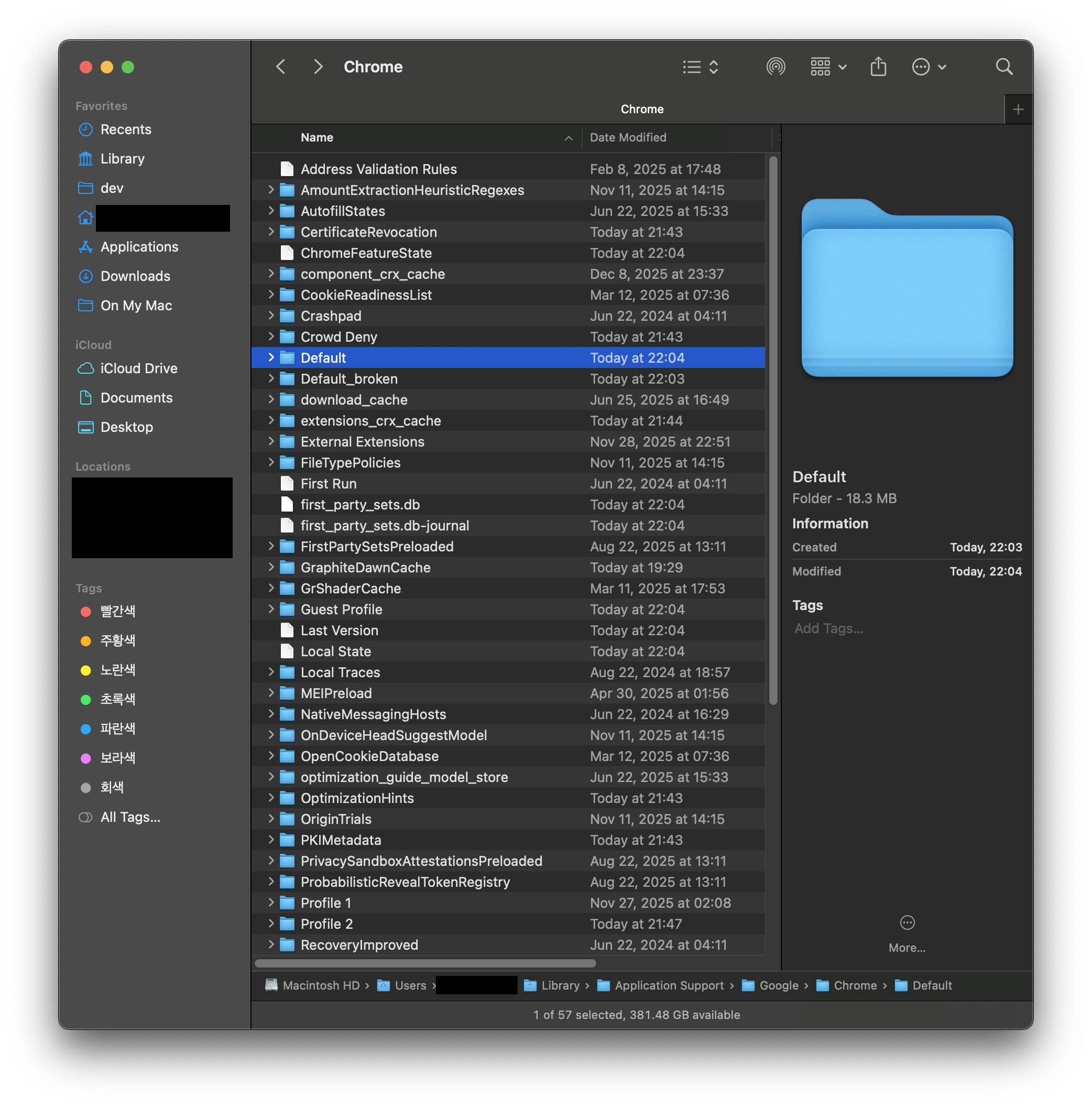
<p>Profile folders like<code>Default</code>, <code>Profile 1</code>, <code>Profile 2</code> were visible.</p>
<h3 class="anchor anchorTargetStickyNavbar_Vzrq" id="step-2-rename-problem-profile-folder">Step 2: Rename Problem Profile Folder<a href="https://blog.l4n14ke4.dev/en/troubleshooting/resolve-blocked-by-an-extension-error#step-2-rename-problem-profile-folder" class="hash-link" aria-label="Direct link to Step 2: Rename Problem Profile Folder" title="Direct link to Step 2: Rename Problem Profile Folder" translate="no">​</a></h3>
<p>After completely closing Chrome, I renamed the problematic <code>Default</code> folder.</p>
<div class="language-bash codeBlockContainer_Ckt0 theme-code-block" style="--prism-color:#393A34;--prism-background-color:#f6f8fa"><div class="codeBlockContent_QJqH"><pre tabindex="0" class="prism-code language-bash codeBlock_bY9V thin-scrollbar" style="color:#393A34;background-color:#f6f8fa"><code class="codeBlockLines_e6Vv"><span class="token-line" style="color:#393A34"><span class="token plain">mv Default Default_broken</span><br></span></code></pre></div></div>
<p>This way, Chrome won't find the <code>Default</code> folder on next launch and will automatically create a new profile.</p>
<p><img decoding="async" loading="lazy" alt="change_profile.png" src="https://blog.l4n14ke4.dev/en/assets/images/change_profile-895d731b27b4ea3947165f687634e5e2.png" width="2084" height="2112" class="img_ev3q"></p>
<h3 class="anchor anchorTargetStickyNavbar_Vzrq" id="step-3-restart-chrome-and-verify">Step 3: Restart Chrome and Verify<a href="https://blog.l4n14ke4.dev/en/troubleshooting/resolve-blocked-by-an-extension-error#step-3-restart-chrome-and-verify" class="hash-link" aria-label="Direct link to Step 3: Restart Chrome and Verify" title="Direct link to Step 3: Restart Chrome and Verify" translate="no">​</a></h3>
<p>I restarted Chrome, a new <code>Default</code> profile was created, and I accessed Google Meet to check site permissions.</p>
<p>Finally, "Blocked by an extension" disappeared, and I could freely choose "Allow" or "Block" for location, camera, and microphone.</p>
<h3 class="anchor anchorTargetStickyNavbar_Vzrq" id="step-4-restore-previous-environment">Step 4: Restore Previous Environment<a href="https://blog.l4n14ke4.dev/en/troubleshooting/resolve-blocked-by-an-extension-error#step-4-restore-previous-environment" class="hash-link" aria-label="Direct link to Step 4: Restore Previous Environment" title="Direct link to Step 4: Restore Previous Environment" translate="no">​</a></h3>
<p>The new profile was in a clean state with no bookmarks, passwords, or extensions. However, after logging in with my Google account and enabling sync, everything was automatically restored.</p>
<p>In <code>chrome://settings/syncSetup</code>, I included the "Extensions" item in sync, and the extensions I used before were reinstalled one by one.</p>
<hr>
<h3 class="anchor anchorTargetStickyNavbar_Vzrq" id="conclusion">Conclusion<a href="https://blog.l4n14ke4.dev/en/troubleshooting/resolve-blocked-by-an-extension-error#conclusion" class="hash-link" aria-label="Direct link to Conclusion" title="Direct link to Conclusion" translate="no">​</a></h3>
<p>If you get a "Blocked by an extension" error but there are actually no extensions or policies, you should suspect profile corruption.</p>
<p>Especially if all of the following conditions are met, profile reset is the answer:</p>
<ul>
<li class="">"Blocked by an extension" still appears even after disabling all extensions</li>
<li class="">No organization policies in chrome://policy</li>
<li class="">Normal operation in other Chrome profiles</li>
<li class="">Problem not resolved even after Chrome settings reset and restart</li>
</ul>
<p>Just rename the profile folder and a new profile will be automatically created, and you can easily restore your environment with Google account sync. After two hours of troubleshooting, it was a problem solved in 5 minutes.</p>
<p>✅ Today's troubleshooting complete!</p>
<!-- -->
<section data-footnotes="" class="footnotes"><h2 class="anchor anchorTargetStickyNavbar_Vzrq sr-only" id="footnote-label">Footnotes<a href="https://blog.l4n14ke4.dev/en/troubleshooting/resolve-blocked-by-an-extension-error#footnote-label" class="hash-link" aria-label="Direct link to Footnotes" title="Direct link to Footnotes" translate="no">​</a></h2>
<ol>
<li class="anchorTargetStickyNavbar_Vzrq" id="user-content-fn-1-1edb5b">
<p>Profile crashes/corrupts - Google Chrome Community, 2025.8.7, <a href="https://support.google.com/chrome/thread/365619817/" target="_blank" rel="noopener noreferrer" class="">https://support.google.com/chrome/thread/365619817/</a> (accessed: 2026.01.30) <a href="https://web.archive.org/web/20260203135716/https://support.google.com/chrome/thread/365619817/" target="_blank" rel="noopener noreferrer" class="">[archive]</a> <a href="https://blog.l4n14ke4.dev/en/troubleshooting/resolve-blocked-by-an-extension-error#user-content-fnref-1-1edb5b" data-footnote-backref="" aria-label="Back to reference 1" class="data-footnote-backref">↩</a></p>
</li>
<li class="anchorTargetStickyNavbar_Vzrq" id="user-content-fn-2-1edb5b">
<p>User Data Directory - Chromium Docs, <a href="https://chromium.googlesource.com/chromium/src/+/HEAD/docs/user_data_dir.md" target="_blank" rel="noopener noreferrer" class="">https://chromium.googlesource.com/chromium/src/+/HEAD/docs/user_data_dir.md</a> (accessed: 2026.01.30) <a href="https://web.archive.org/web/20260131042025/https://chromium.googlesource.com/chromium/src/+/HEAD/docs/user_data_dir.md" target="_blank" rel="noopener noreferrer" class="">[archive]</a> <a href="https://blog.l4n14ke4.dev/en/troubleshooting/resolve-blocked-by-an-extension-error#user-content-fnref-2-1edb5b" data-footnote-backref="" aria-label="Back to reference 2" class="data-footnote-backref">↩</a></p>
</li>
</ol>
</section>]]></content>
        <author>
            <name>L4N14KE4</name>
            <uri>https://github.com/L4N14KE4</uri>
        </author>
        <category label="Chrome" term="Chrome"/>
        <category label="Troubleshooting" term="Troubleshooting"/>
    </entry>
</feed>